> For the complete documentation index, see [llms.txt](https://docs.membercounter.app/llms.txt). Markdown versions of documentation pages are available by appending `.md` to page URLs; this page is available as [Markdown](https://docs.membercounter.app/commands/bot-commands.md).

# All commands

The five slash commands the bot adds, and who can run them.

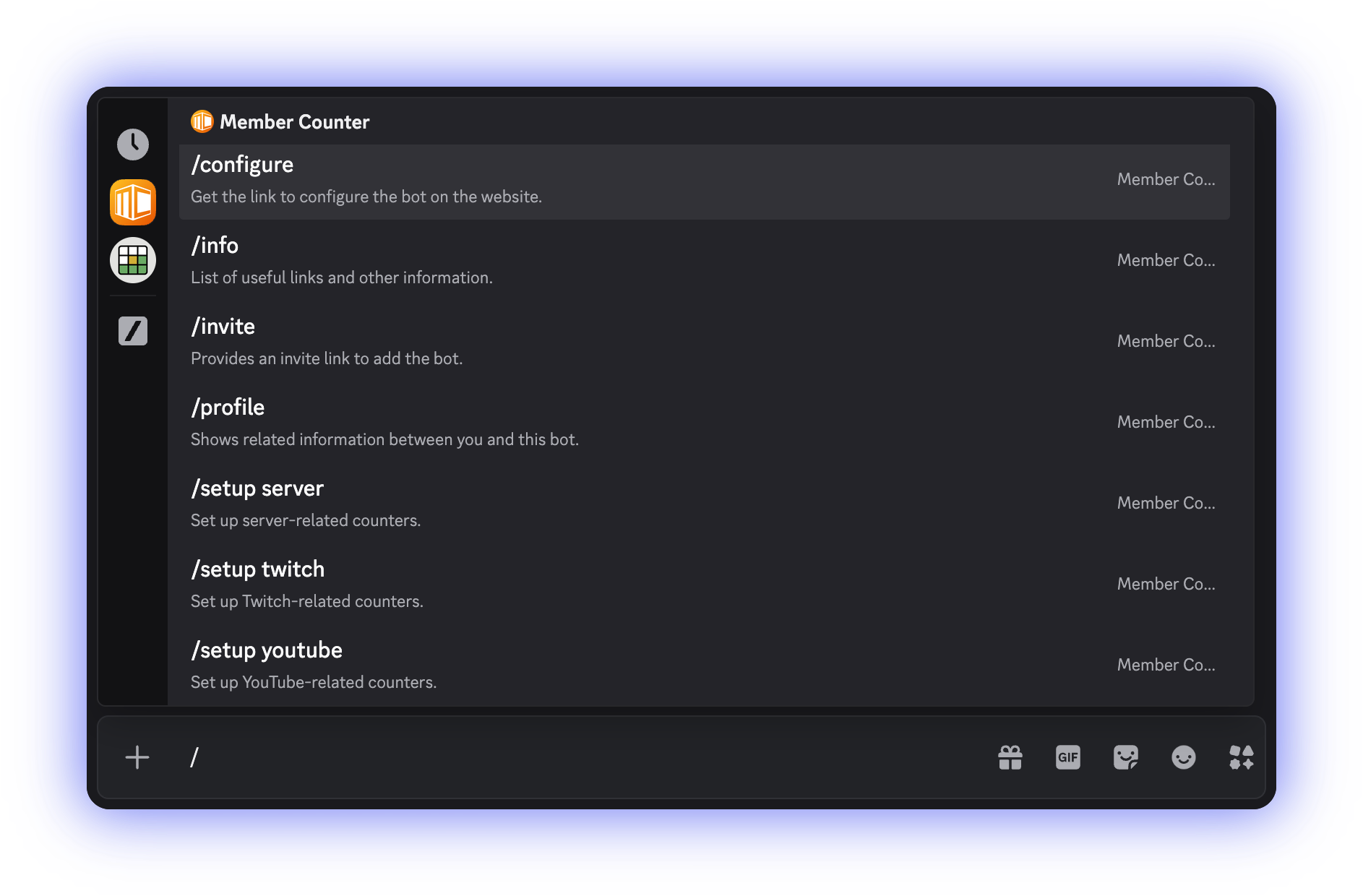
Member Counter adds five slash commands and one right-click entry.

<figure><img src="https://1582170640-files.gitbook.io/~/files/v0/b/gitbook-x-prod.appspot.com/o/spaces%2F-Lu2S5r7lKtu4IK5ucu9%2Fuploads%2Fgit-blob-c5faa832d7b25f8613c6594928346faa6d66cf48%2Fcommand-list-autocomplete.png?alt=media" alt="Discord&#x27;s command picker listing the bot&#x27;s commands"><figcaption><p>Type <code>/</code> and pick Member Counter to see the list.</p></figcaption></figure>

## The commands

| Command                                | What it does                                        | Who can run it                  |
| -------------------------------------- | --------------------------------------------------- | ------------------------------- |
| [`/info`](/commands/info.md)           | List of useful links and other information.         | Anyone, also in DMs             |
| [`/profile`](/commands/profile.md)     | Shows related information between you and this bot. | Anyone, also in DMs             |
| [`/invite`](/commands/invite.md)       | Provides an invite link to add the bot.             | Anyone, also in DMs             |
| [`/configure`](/commands/configure.md) | Get the link to configure the bot on the website.   | Administrators, in servers only |
| [`/setup`](/commands/setup.md)         | Set up some basic counters.                         | Administrators, in servers only |

`/setup` appears in the picker once per subcommand: `/setup server`, `/setup twitch` and `/setup youtube`.

`/profile` has a second way in: right-click any member and choose **Apps** > **Profile**. It is the same command with the same reply.

Everything else happens on the [dashboard](https://membercounter.app/dashboard): creating counters, editing templates, formatting and server settings.

## Every reply is ephemeral

Only you see the reply. It is not posted in the channel, and it disappears when you dismiss it or restart Discord. You cannot share one with a message link either, so take a screenshot or send the other person the command to run.

## Who can run `/configure` and `/setup`

Both are marked as **Administrator** commands and work only in a server, so by default only administrators see them in the command picker.

A server owner can hand either command to other roles, or restrict it to certain channels, in **Server Settings** > **Integrations** > **Member Counter**.

{% hint style="warning" %}
`/setup` creates channels. Anyone you allow to run it can create channels through the bot, even without Manage Channels themselves.
{% endhint %}

## Languages

Command names, descriptions and replies are translated into 19 Discord languages, and fall back to English (US). The reply follows the language of the person who ran the command.

You can help translate the bot at [tolgee.membercounter.app](https://tolgee.membercounter.app/). See [How to contribute](/contributing/how-to-contribute.md).

## When a command fails

The reply is an error message instead. If the bot recognises the problem it explains it in plain words. Otherwise it shows "Something went wrong, please try again later." with an error ID. Either way a **Join support server** button is attached, and quoting the error ID gets you help faster. See [Troubleshooting](/using-the-dashboard/troubleshooting.md).

<details>

<summary>Technical details</summary>

* The shared handler calls `deferReply({ flags: MessageFlags.Ephemeral })` before dispatching to any command.
* `apps/bot/src/i18n.ts` holds the locale list: 19 locales (en-US, en-GB, es-ES, es-419, ru, cs, de, tr, el, fi, fr, it, ja, ko, nl, no, pl, sv-SE, zh-CN) served from 17 translation files, because en-GB reuses the en-US file and es-419 reuses es-ES. The default is en-US.
* A reply uses the invoker's client locale, but the automatic channel updates use the server's preferred locale, so a channel name reads the same for everyone.
* `/configure` and `/setup` only carry Discord's default Administrator permission and are guild-only. The bot itself runs no permission check, so whatever Server Settings > Integrations allows, works.
* Commands are registered globally at startup. `DISCORD_BOT_INSTANCE_DEPLOY_COMMANDS=false` skips registration; a server id in that variable registers the commands to that server only.
* A recognised error is shown as its `knownErrors.<CODE>` string; anything else falls back to the generic "Something went wrong" message.
* The error ID is the OpenTelemetry trace id of the interaction span and only the hosted bots produce one. A self-hosted bot shows the literal `Error ID: {{ERROR_ID}}`; read the bot's own log instead.

</details>
