> For the complete documentation index, see [llms.txt](https://docs.membercounter.app/llms.txt). Markdown versions of documentation pages are available by appending `.md` to page URLs; this page is available as [Markdown](https://docs.membercounter.app/counters-reference/concat.md).
# Concat
Concatenate multiple strings into one.
The Concat counter glues several pieces of text together into a single value. Each piece can be text you type or a [nested counter](/using-the-dashboard/nested-counters.md). You mostly need it when another counter's option expects **one** value and you want that value built out of several parts.
**Availability:** every bot type. It makes no network requests, so it needs no API key and no environment variable when you [self-host](/self-hosting/configuration.md).
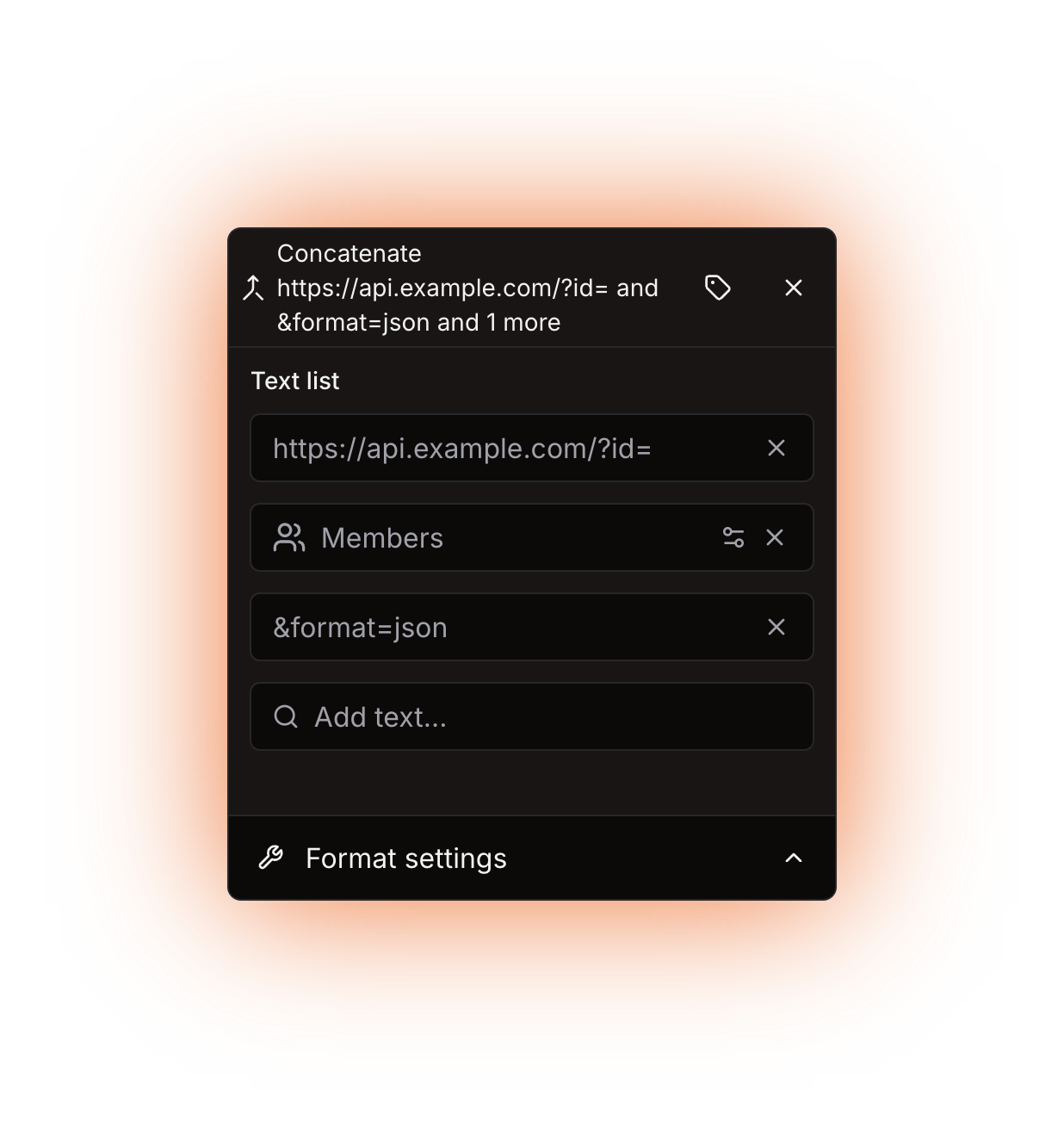
The Concat counter panel: a single Text list
## Options
| Option | What it does | Notes |
| ------------- | ---------------------------------------------------------------- | -------------------------------------------------------------------------------------------------------------------------- |
| **Text list** | The pieces that are joined together, in the order you list them. | Type into the **Add text...** box to append a piece, or pick a counter from it to nest one. There is no separator setting. |
Every row of **Text list** takes a nested counter, and that counter can return anything: the bot turns numbers into text before joining them.
Concat itself nests in options such as:
* the **Input text** of a [Replace](/counters-reference/replace.md) counter,
* the **URL (GET)** of an [HTTP](/counters-reference/http.md) counter, where part of the address comes from another counter,
* any option that takes one nested counter but you need several values in it.
## What it returns
A single piece of text: every entry turned into text and stuck together in order. An empty **Text list** returns empty text.
{% hint style="warning" %}
**Nothing is inserted between the items.** A **Text list** of `Online` and `42` returns `Online42`, not `Online 42`. Add the separator as its own entry. It cannot be a space: what you type is trimmed, so a space adds nothing. Use visible text such as `/` instead.
{% endhint %}
## Formatting
A Concat result is text, and the bot only formats numbers, so **Use compact notation**, **Override default locale** and **Override default digits** have no effect on it. That includes numbers produced *inside* the Concat counter: a [Members](/counters-reference/members.md) counter nested in **Text list** contributes its raw value.
If you need a number formatted, keep [Number](/counters-reference/number.md) or [Math](/counters-reference/math.md) as the outermost counter instead, and type the surrounding text directly into the template. See [Formatting counters](/using-the-dashboard/customizing-counters.md).
## Refresh and caching
Concat caches nothing. The bot works it out again on every channel update, every 10 minutes on the public bot and every 5 minutes on the other bot types. Anything nested inside it keeps its own refresh behaviour. See [How counters update](/using-the-dashboard/how-counters-update.md).
## Examples
{% tabs %}
{% tab title="Building a URL" %}
An [HTTP](/counters-reference/http.md) counter takes a single **URL (GET)**. To put a value from another counter into the middle of that address, build the address with Concat and nest the Concat counter in the **URL (GET)** field.
**Text list**, in order:
1. `https://api.example.com/v1/stats?server=`
2. a nested counter that returns the identifier you need
3. `&format=json`
The HTTP counter then receives one finished address.
{% endtab %}
{% tab title="Joining values with a separator" %}
Because nothing is inserted automatically, the separator is just another entry.
**Text list**, in order:
1. a nested [Members](/counters-reference/members.md) counter with no filters
2. `/`
3. a nested **Members** counter with **Filter by status** set to **Online + Idle + DND**
That returns something like `120/47`.
{% endtab %}
{% endtabs %}
## Errors
Concat has no errors of its own. What can still go wrong:
| What you see | What to do |
| ------------------------------------------------------------------- | --------------------------------------------------------------------------------------------------------------------------------------------------------------------------------- |
| The channel shows `ERROR!` | A counter nested inside **Text list** failed, so the whole template failed. Open the channel in the dashboard and read the error to find the counter at fault. |
| **The result for the channel name is less than 2 characters long.** | A voice or category channel name needs at least 2 characters, and an empty **Text list** is the usual reason. Fill **Text list**, or add text around the counter in the template. |
A very long result is cut off rather than failing.
If it still fails, [Troubleshooting](/using-the-dashboard/troubleshooting.md) covers the common causes, and you can ask on the [support server](https://membercounter.app/support).
Technical details
* Evaluator: `packages/services/src/DataSource/DataSourceEvaluator/evaluators/concat.ts`. Entries are stored in `options.strings` as literals or nested counter objects, turned into text with `String()` and joined onto an empty-string seed, which is why an empty list returns empty text instead of failing and why the counter itself can never throw.
* Only numbers go through the result formatter; a string result is returned untouched, which is why the formatting options do nothing here.
* A whitespace-only entry is trimmed before it is stored, so it never becomes a row.
* Global limits: 60 s per counter in the template, shared with everything nested inside it (`EVALUATION_TIMEOUT`), 50,000 tree-exploration iterations, and a final result that is trimmed and then cut to 1023 characters for a topic or 99 for a channel name, with the 2-character minimum (`EVALUATION_RESULT_FOR_CHANNEL_NAME_IS_LESS_THAN_2_CHARACTERS`) checked before the cut.
* When a nested counter makes the template fail, the update job writes `jobs.updateChannels.computeError` into the name or topic: `ERROR!` in en-US, translated in the other locales.
* No network access, no cache entry and no environment variable when self-hosting.