> For the complete documentation index, see [llms.txt](https://docs.membercounter.app/llms.txt). Markdown versions of documentation pages are available by appending `.md` to page URLs; this page is available as [Markdown](https://docs.membercounter.app/counters-reference/http.md).

# HTTP

Send a GET request to an endpoint and provide the result to this bot.

The HTTP counter requests a URL and puts the answer into your template. Use it for any API that answers with a short number or a short text.

**Availability:** every bot. It needs no privileged intents.

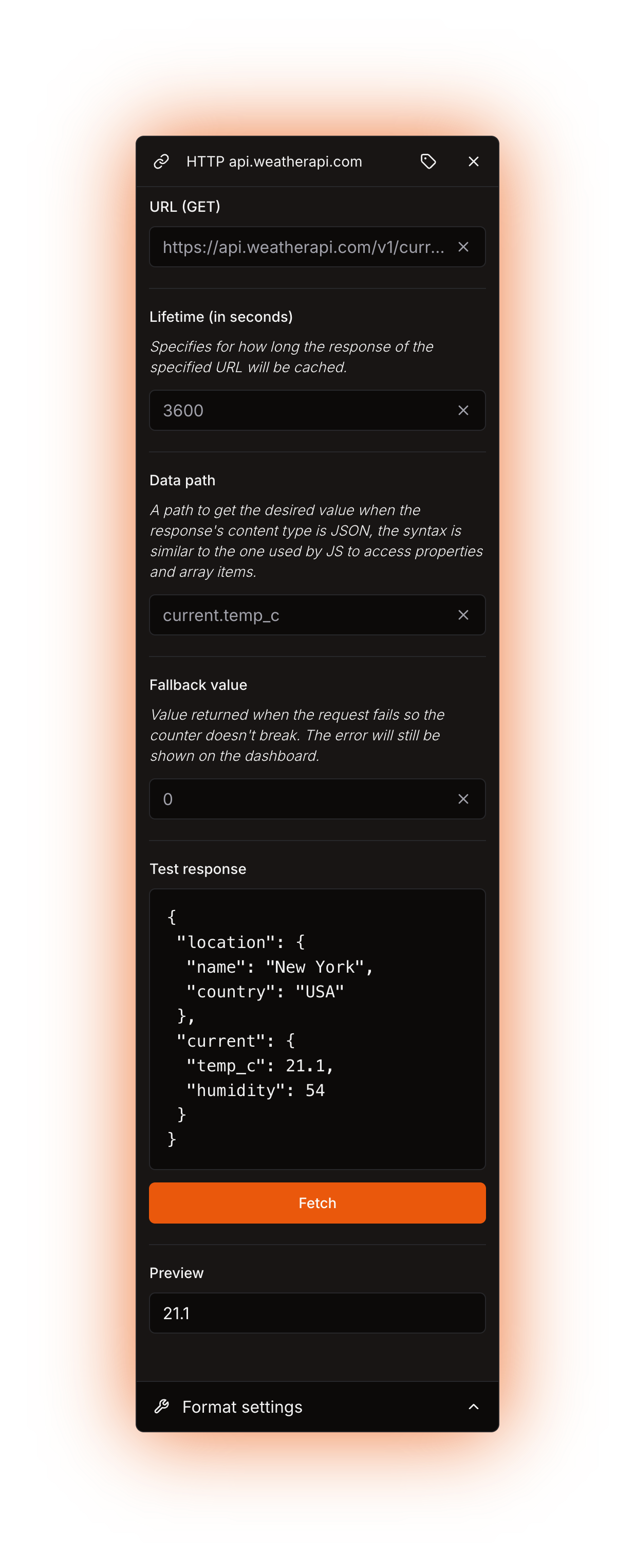
<figure><img src="https://1582170640-files.gitbook.io/~/files/v0/b/gitbook-x-prod.appspot.com/o/spaces%2F-Lu2S5r7lKtu4IK5ucu9%2Fuploads%2Fgit-blob-650b65295b6f55f615d505a605501e53c787ba43%2Fcounter-http-options.png?alt=media" alt="HTTP counter options"><figcaption><p>The HTTP counter panel with every option filled in. The API key here is a placeholder, so <strong>Test response</strong> still holds the built-in sample and <strong>Preview</strong> reports that the path is not in it</p></figcaption></figure>

## Options

| Option                    | What it does                                                                                | Notes                                                                                                    |
| ------------------------- | ------------------------------------------------------------------------------------------- | -------------------------------------------------------------------------------------------------------- |
| **URL (GET)**             | The endpoint the bot requests.                                                              | Required. Only `GET` is supported: no headers, no body, so an API key has to travel in the query string. |
| **Lifetime (in seconds)** | How long the response is cached.                                                            | Optional. Empty means no cache. See [Refresh and caching](#refresh-and-caching).                         |
| **Data path**             | Where the value you want sits inside a JSON response.                                       | Required when the response is JSON, ignored when it is plain text.                                       |
| **Fallback value**        | The value the counter returns when the request fails, so the counter does not break.        | Optional. It covers every failure of the request.                                                        |
| **Display label**         | A custom name for this counter's chip in the editor. It does not change the channel output. | Optional. Open it with the **Edit display label** button.                                                |

**URL (GET)**, **Lifetime (in seconds)**, **Data path** and **Fallback value** each accept another counter instead of a typed value. Hover the gear button on the nested counter's row to read what it has to return. See [Nested counters](/using-the-dashboard/nested-counters.md).

{% hint style="danger" %}
Anyone who can open your server in the dashboard can read the URL, API key included, so use a read-only key.
{% endhint %}

## Data path

The syntax is the one JS uses to access properties and array items.

| Syntax                 | Example          | What it does                                                                     |
| ---------------------- | ---------------- | -------------------------------------------------------------------------------- |
| `key`                  | `current`        | Reads a property.                                                                |
| `.key`                 | `current.temp_c` | Reads a property of the previous step. Keys with spaces or dashes work unquoted. |
| `["key"]` or `['key']` | `["a.b"]`        | Reads a property whose name contains a dot, a bracket or a quote.                |
| `[0]`                  | `[0].price_usd`  | Reads an array item.                                                             |

{% hint style="warning" %}
`[0]` to `[9]` are the only bracket indexes that work. Write `a["10"].v` or `a.10.v` for anything higher.
{% endhint %}

## What it returns

* A `text/plain` response is returned whole, and **Data path** is ignored.
* An `application/json` response returns the value found at **Data path**.
* Only numbers and strings can be shown. A boolean, `null`, an object or an array fails.
* With a **Fallback value** set, a failed request returns that value and the channel keeps updating. The dashboard still lists the real error on the counter.
* Without one, a failed request renames the channel (or rewrites the topic) to `ERROR!` until the next successful update.

A channel name must be at least 2 characters, so an endpoint that answers with a single character breaks a counter that stands alone in a voice or category channel name. Put some text around it.

## Testing in the dashboard

<figure><img src="https://1582170640-files.gitbook.io/~/files/v0/b/gitbook-x-prod.appspot.com/o/spaces%2F-Lu2S5r7lKtu4IK5ucu9%2Fuploads%2Fgit-blob-5ca39a36abd24cf780b93eb3a77d8496a2209ab7%2Fcounter-http-test-response.png?alt=media" alt="Fetch, Test response and Preview"><figcaption><p>The response and the value the Data path pulls out of it</p></figcaption></figure>

1. Opening a counter that already has a URL fetches it once. On a new counter, type a URL first, then press **Fetch**.
2. **Test response** shows the body that came back, pretty-printed when it is JSON.
3. **Preview** shows the value your **Data path** pulls out of that body, and updates as you type. A wrong path shows the error here instead of the value.

{% hint style="warning" %}
**Fetch** only checks that the URL answers with status 200. It ignores the content type and the cache, so a URL can preview fine and still fail when the bot evaluates the counter.
{% endhint %}

You cannot test a counter whose **Data path** is a nested counter, and **Fetch** does nothing when only **URL (GET)** is one. Preview the whole template instead, as described in [Template editor](/using-the-dashboard/template-editor.md).

## Formatting

Number formatting applies to numbers only. A `text/plain` body and a JSON string are printed exactly as they arrived, so **Use compact notation**, **Override default locale** and **Override default digits** do nothing for them. To format a value an API sends as a JSON string, put the HTTP counter inside a [Number](/counters-reference/number.md) counter. The formatting settings then apply, and the conversion drops trailing zeros. See [Formatting counters](/using-the-dashboard/customizing-counters.md).

## Refresh and caching

With **Lifetime (in seconds)** empty or `0` the bot requests the URL on every channel update: every 10 minutes on the public bot, every 5 minutes on the legacy premium bot, custom bots and self-hosted bots. With a lifetime set, the response is stored and reused until it expires. Match it to your API's rate limit: `3600` for a weather endpoint you read once an hour, `300` for a price. See [How counters update](/using-the-dashboard/how-counters-update.md).

{% hint style="warning" %}
Counters that use the exact same URL share the cached response, in every server.
{% endhint %}

## Examples

More free APIs in the [public-apis list](https://github.com/public-apis/public-apis).

{% tabs %}
{% tab title="Weather" %}
Current temperature in New York from [WeatherAPI](https://www.weatherapi.com/docs/) (free, API key after signing up).

| Option                    | Value                                                                               |
| ------------------------- | ----------------------------------------------------------------------------------- |
| **URL (GET)**             | `https://api.weatherapi.com/v1/current.json?key=<YOUR API KEY>&q=New%20York&aqi=no` |
| **Lifetime (in seconds)** | `3600`                                                                              |
| **Data path**             | `current.temp_c`                                                                    |

The response also carries `current.temp_f` for Fahrenheit and `current.is_day` (`1` by day, `0` by night). Feed `current.is_day` into a [Replace](/counters-reference/replace.md) counter to turn it into ☀️ or 🌙.

<figure><img src="https://1582170640-files.gitbook.io/~/files/v0/b/gitbook-x-prod.appspot.com/o/spaces%2F-Lu2S5r7lKtu4IK5ucu9%2Fuploads%2Fgit-blob-7b805a1cd73081baae081ce382907d0e1beedddb%2Fcounter-http-example-weather.png?alt=media" alt="Weather example"><figcaption><p>The counter sits between <code>New York</code> and <code>°C</code> in the template</p></figcaption></figure>
{% endtab %}

{% tab title="Air quality" %}
US air quality index for Los Angeles from [IQAir](https://api-docs.iqair.com/) (free, API key after signing up).

| Option                    | Value                                                                                                  |
| ------------------------- | ------------------------------------------------------------------------------------------------------ |
| **URL (GET)**             | `https://api.airvisual.com/v2/city?city=Los%20Angeles&state=California&country=USA&key=<YOUR API KEY>` |
| **Lifetime (in seconds)** | `3600`                                                                                                 |
| **Data path**             | `data.current.pollution.aqius`                                                                         |

<figure><img src="https://1582170640-files.gitbook.io/~/files/v0/b/gitbook-x-prod.appspot.com/o/spaces%2F-Lu2S5r7lKtu4IK5ucu9%2Fuploads%2Fgit-blob-0ac65cf9ba5bdd8d84ee29f534d90b88b00b5419%2Fcounter-http-example-air-quality.png?alt=media" alt="Air quality example"><figcaption><p>The counter after the text <code>LA AQI -</code> , with the IQAir endpoint, a one hour lifetime and the data path filled in</p></figcaption></figure>
{% endtab %}

{% tab title="Crypto price" %}
Bitcoin price in USD from the [Coinlore API](https://www.coinlore.com/cryptocurrency-data-api) (free, no API key).

| Option                    | Value                                        |
| ------------------------- | -------------------------------------------- |
| **URL (GET)**             | `https://api.coinlore.net/api/ticker/?id=90` |
| **Lifetime (in seconds)** | `300`                                        |
| **Data path**             | `[0].price_usd`                              |

The endpoint answers with an array, which is why the path starts with `[0]`. Coinlore sends the price as a JSON string, so it reaches the channel exactly as written. Wrap the HTTP counter in a [Number](/counters-reference/number.md) counter if you want compact notation or a different locale applied to it.

<figure><img src="https://1582170640-files.gitbook.io/~/files/v0/b/gitbook-x-prod.appspot.com/o/spaces%2F-Lu2S5r7lKtu4IK5ucu9%2Fuploads%2Fgit-blob-aadda08ca40458f0ce6e155e3d72131ffd4730a7%2Fcounter-http-example-crypto.png?alt=media" alt="Crypto price example"><figcaption><p>Template: <code>BTC: $81502.27</code>, the live price when this was captured</p></figcaption></figure>
{% endtab %}
{% endtabs %}

## Errors

| Message                                                                                   | What to do                                                                                                                          |
| ----------------------------------------------------------------------------------------- | ----------------------------------------------------------------------------------------------------------------------------------- |
| *The HTTP counter requires a URL, which is missing.*                                      | Fill **URL (GET)**. A **Fallback value** does not cover this.                                                                       |
| *The HTTP response status code is invalid (not 200).*                                     | Check the API key and the query string, then press **Fetch**.                                                                       |
| *The content type of the HTTP response is invalid (not text/plain or application/json).*  | Look for another endpoint or another API.                                                                                           |
| *A data path must be specified for HTTP requests whose content type is application/json.* | Fill **Data path**.                                                                                                                 |
| `"<key>" doesn't exists in <path>`                                                        | The path does not match the response. Press **Fetch** and check the **Test response** box.                                          |
| `Only number, string values can be returned, but got <type>`                              | The path stops on an object, an array, a boolean or `null`. Walk one step further, or remember that `[10]` and above need `["10"]`. |
| *The evaluation took too long and timed out.*                                             | Use a faster endpoint, or set a **Lifetime (in seconds)** so the value is reused.                                                   |
| *The result for the channel name is less than 2 characters long.*                         | Put some text around the counter.                                                                                                   |
| *The URL of the HTTP counter points to a private or forbidden network address.*           | On the bots we host, that address is not allowed. Use a public endpoint.                                                            |

Errors a **Fallback value** absorbed are still listed on the counter in the dashboard, so check there when a value looks frozen. More in [Troubleshooting](/using-the-dashboard/troubleshooting.md).

<details>

<summary>Technical details</summary>

* Evaluator: `packages/services/src/DataSource/DataSourceEvaluator/evaluators/http.ts`.
* The request sends `User-Agent: Member Counter Discord Bot` and is aborted after 5 seconds.
* The content type is compared after everything from the `;` is cut off, so `application/json;charset=utf-8` passes. A missing `Content-Type` compares as an empty string and fails.
* Cache key: `dataSourceCacheKey(DataSourceId.HTTP, url)`, the counter type plus the URL, with no guild id in it. The first fetch sets the expiry, and an entry that no longer parses is deleted and fetched again.
* Evaluations that want the same key at the same moment share one in-flight request. A Redis failure counts as a cache miss, so the counter still answers, uncached.
* The path walks at most 48 steps, then throws `Path length exceeded`. The bracket index pattern matches a single digit, so `a[10].v` is never parsed: the walk stops at `a` and the type check reports `got object`. `null` and arrays also report `got object`.
* A missing key throws `"<key>" doesn't exists in <the path travelled so far>`, or `"<key>" doesn't exists in the response` when it fails on the first step.
* `HTTP_MISSING_URL` is raised before the fallback is applied, which is why **Fallback value** cannot cover it. Every other failure is absorbed by a fallback when one is set, and reported as a non-fatal error on the counter.
* Each top-level counter of a template races its own 60 s timeout; nested counters share their parent's budget. The finished result is trimmed, then cut to 1023 characters on text and announcement topics and to 99 characters on other channel names.
* **Fetch** in the dashboard uses the same timeout and user agent, with no content type check and no cache. A non-200 comes back as `HTTP <status> <statusText>`.
* Self-hosting: `REDIS_URL` stores the **Lifetime (in seconds)** cache. The evaluator calls plain `fetch` there, so no address is filtered: anyone you let configure counters can point this counter at your LAN or at `localhost` and read the answer.
* The hosted bots swap that for a guarded fetch: it resolves the address, checks the built-in denied ranges and the operator's allowed and denied host lists, and raises `HTTP_FORBIDDEN_TARGET`. Both lists are empty by default. The snapshot refreshes at most every 10 seconds, and its version is part of the cache key, so a new deny drops the bodies cached under the old policy.
* `DATA_SOURCE_HTTP_ALLOW_PRIVATE_ADDRESSES=true` removes that guard. It exists for local development.

</details>
