> For the complete documentation index, see [llms.txt](https://docs.membercounter.app/llms.txt). Markdown versions of documentation pages are available by appending `.md` to page URLs; this page is available as [Markdown](https://docs.membercounter.app/counters-reference/twitch.md).
# Twitch
Retrieve the follower count, live viewer count or channel name of a Twitch channel.
The Twitch counter follows one Twitch channel and returns its follower count, how many people are watching right now, or the channel's display name.
**Availability:** a [custom bot](/custom-bot/custom-bot.md), a [self-hosted bot](/self-hosting/self-hosting.md) or the legacy premium bot. It does **not** work on the free public bot. A self-hosted bot needs `TWITCH_CLIENT_ID` and `TWITCH_CLIENT_SECRET` in its `.env`; see the [configuration reference](/self-hosting/configuration.md).
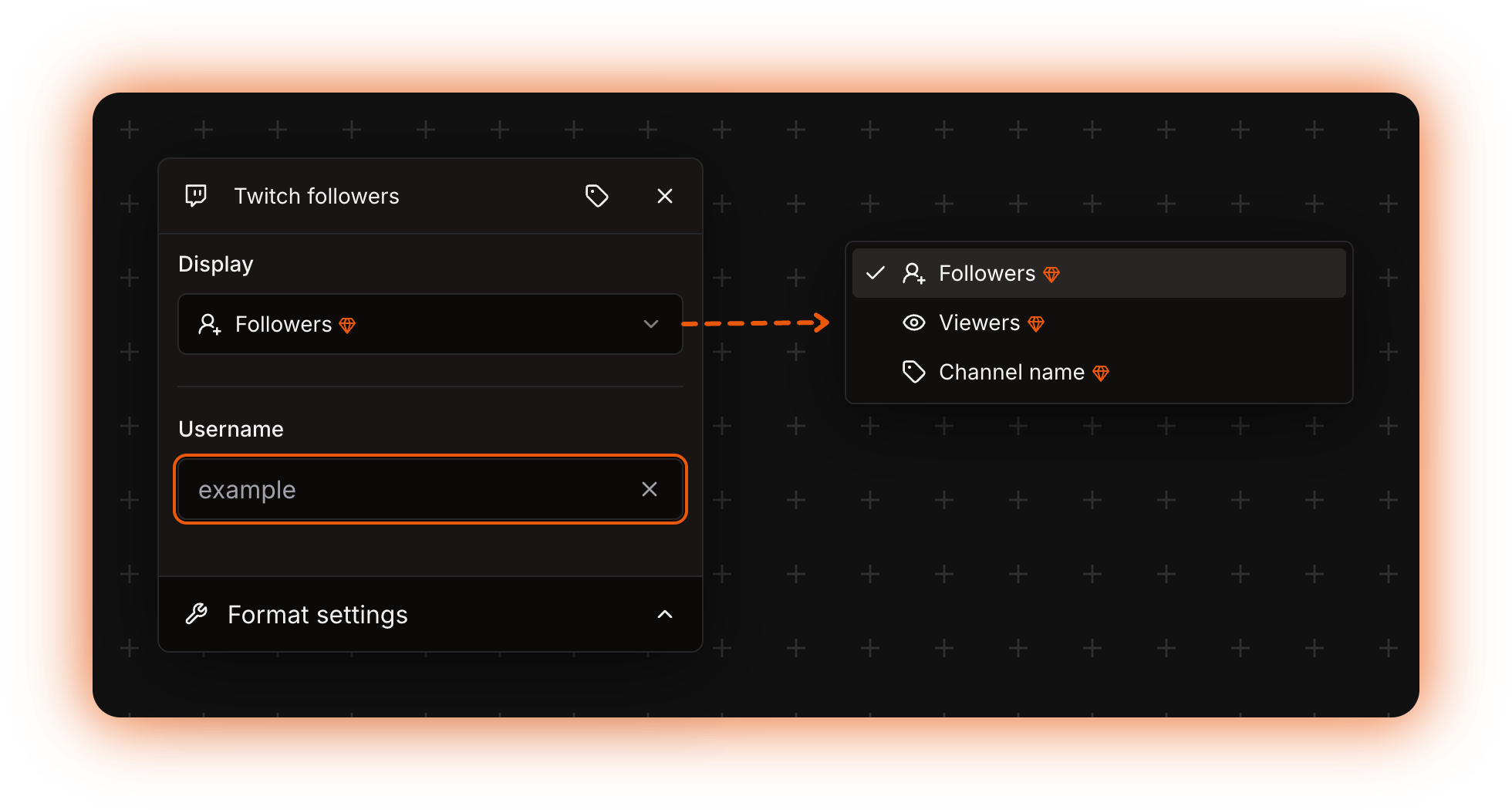
The Twitch counter options in the template editor
## Options
| Option | What it does | Notes |
| ------------ | ------------------------------------------------------------------------------- | ------------------------------------------------------------------------------------------------------------------------------------------------------------------ |
| **Display** | Picks what the counter outputs: **Followers**, **Viewers** or **Channel name**. | Starts on **Followers**. Does not accept a nested counter. |
| **Username** | The Twitch channel to follow. | Type the login name, the part after `twitch.tv/`. It also accepts a [nested counter](/using-the-dashboard/nested-counters.md), which must return a valid username. |
{% hint style="warning" %}
**Username** is the login name from the channel address, not the capitalised display name and not a full URL. For `twitch.tv/example` you type `example`.
{% endhint %}
## What it returns
| **Display** | Value |
| ---------------- | --------------------------------------------------------------------------------------------------------------- |
| **Followers** | How many followers the channel has. |
| **Viewers** | The viewer count while the stream is live, or the text `offline`, in lower case, when it is not. |
| **Channel name** | The channel's display name, with the capitalisation the streamer chose. It can differ from the login you typed. |
## Formatting
**Followers** and a live **Viewers** count are numbers, so the **Format settings** panel applies. **Channel name** and `offline` are text and come back untouched. See [Formatting counters](/using-the-dashboard/customizing-counters.md).
## Refresh and caching
The bot keeps each channel's data for 15 minutes, so a stream that just went live can take up to 15 minutes to show up. More in [How counters update](/using-the-dashboard/how-counters-update.md).
## Examples
{% tabs %}
{% tab title="Followers" %}
**Display** = **Followers**, **Username** = `example`, **Use compact notation** = **Yes**.
A channel with 1,240 followers shows as `1.2K`.
{% endtab %}
{% tab title="Live viewers" %}
**Display** = **Viewers**, **Username** = `example`.
While the stream is live the channel shows the viewer count, for example `Viewers: 342`. The rest of the time it reads `offline`. To use your own wording off air, nest the Twitch counter in a [Replace](/counters-reference/replace.md) counter and replace `offline`.
{% endtab %}
{% endtabs %}
The same counter live and off air
## Errors
| Message | What to do |
| -------------------------------------------------------------------------------------- | ----------------------------------------------------------------------------------------------------------------------------------- |
| `The bot is not a premium version and lacks certain features needed for this counter.` | The counter is running on the free public bot. Use the legacy premium bot, a [custom bot](/custom-bot/custom-bot.md), or self-host. |
| `The Twitch counter requires a username to be set.` | Fill in **Username**, or check that the nested counter in it returns a name. |
| `The specified Twitch channel could not be found.` | No Twitch channel has that login name. Check the spelling against the channel address. |
On a self-hosted bot with no `TWITCH_CLIENT_ID` and `TWITCH_CLIENT_SECRET`, every Twitch counter fails with a raw error instead. Get the credentials from [the Twitch developer console](https://dev.twitch.tv/console/apps) and set both variables. See [Troubleshooting](/using-the-dashboard/troubleshooting.md).
Technical details
* Evaluator: `packages/services/src/DataSource/DataSourceEvaluator/evaluators/Twitch.ts`.
* The checks run in this order: `isPremium`, then **Username**, then the lookup. On the free public bot the premium error always comes first, even when the rest of the counter is empty.
* The API client is built once when the bot starts, from `TWITCH_CLIENT_ID` and `TWITCH_CLIENT_SECRET`. If either is missing the client is never created and every Twitch counter on that instance throws `"TWITCH_CLIENT_ID" or "TWITCH_CLIENT_SECRET" not provided`, which is not translated and reaches the dashboard as a generic failure.
* Cached in Redis for 15 minutes under the key `1:13:`. The key holds no server id, so every server watching the same channel shares one fetch.
* Each lookup makes three Twitch API calls, and one cache entry holds the channel name, the follower count and the viewer count together, so the three **Display** values refresh at the same moment.
* Only successful lookups are cached. A failing counter retries on every channel update.
* The update job runs every 5 minutes on premium, custom and self-hosted bots, on its own clock, so in the worst case the text on the channel is about 20 minutes behind Twitch.
* An unset **Display** evaluates as **Followers**.
* `The bot is not a premium version and lacks certain features needed for this counter.` (`BOT_IS_NOT_PREMIUM`): the bot instance runs with `isPremium` false.
* `The Twitch counter requires a username to be set.` (`TWITCH_MISSING_USERNAME`): **Username** is empty, or the nested counter in it returned nothing.
* `The specified Twitch channel could not be found.` (`TWITCH_CHANNEL_NOT_FOUND`): the lookup found no channel with that login.
* `The evaluation took too long and timed out.` (`EVALUATION_TIMEOUT`): one counter in the template took more than 60 seconds.
* Self-hosting: `TWITCH_CLIENT_ID` and `TWITCH_CLIENT_SECRET`, plus `DISCORD_BOT_INSTANCE_IS_PREMIUM` left at its default `true`. Custom bots are started with that flag forced on.