> For the complete documentation index, see [llms.txt](https://docs.membercounter.app/llms.txt). Markdown versions of documentation pages are available by appending `.md` to page URLs; this page is available as [Markdown](https://docs.membercounter.app/counters-reference/youtube.md).
# YouTube
Fetch subscriber count, video count, and total views from a YouTube channel.
The YouTube counter follows one YouTube channel and returns its subscriber count, its lifetime views, how many videos it has published, or its name.
**Availability:** a [custom bot](/custom-bot/custom-bot.md), a [self-hosted bot](/self-hosting/self-hosting.md) or the legacy premium bot. It does **not** work on the free public bot. A self-hosted bot needs `YOUTUBE_API_KEY` in its `.env`; see the [configuration reference](/self-hosting/configuration.md).
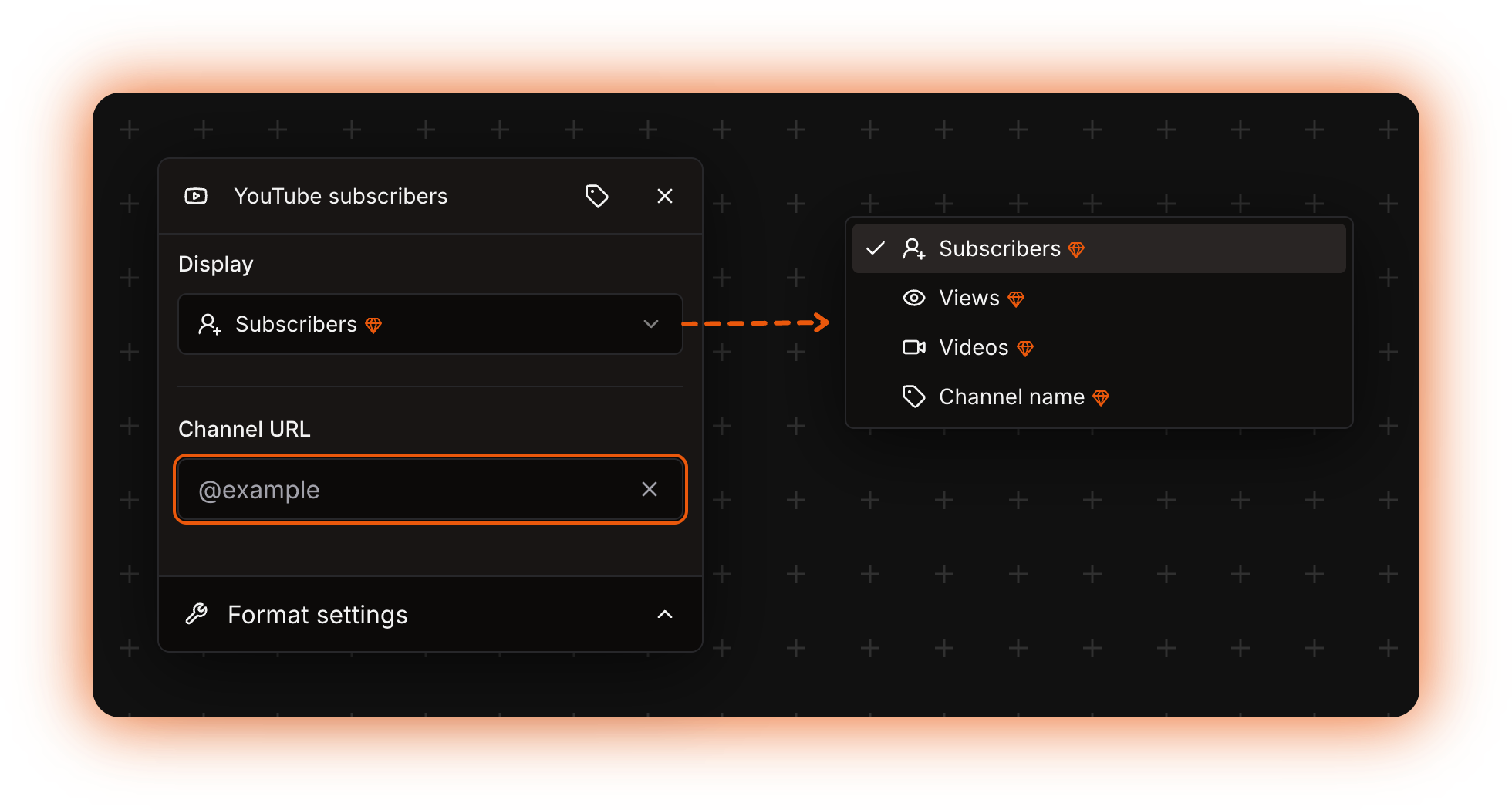
The YouTube counter options in the template editor
## Options
| Option | What it does | Notes |
| --------------- | ------------------------------------------------------------------------------------------- | ------------------------------------------------------------------------------------------------------------------------------------------------------- |
| **Display** | Picks what the counter outputs: **Subscribers**, **Views**, **Videos** or **Channel name**. | Starts on **Subscribers**. Does not accept a nested counter. |
| **Channel URL** | The channel to look up, written as an `@handle` or a YouTube address. | Only the shapes below are accepted. It also accepts a [nested counter](/using-the-dashboard/nested-counters.md), which must return a valid channel URL. |
### Accepted **Channel URL** shapes
`http://` or `https://` at the front is optional, and so is `www.` or `m.`.
| What you type | How the bot finds the channel |
| --------------------------- | ----------------------------- |
| `@handle` on its own | By handle. Prefer this shape. |
| `youtube.com/@handle` | By handle. |
| `youtube.com/channel/UC...` | By channel ID. |
| `youtube.com/user/name` | By legacy username. |
| `youtube.com/c/name` | By legacy username. |
Anything else is refused as invalid, including a bare channel ID, video links, `youtu.be` links and playlist links. A trailing `/videos`, `/about` or `?si=...` makes the lookup fail.
{% hint style="warning" %}
Most `youtube.com/c/name` addresses are looked up as legacy usernames and no longer resolve, so the counter fails. Use the `@handle` form.
{% endhint %}
## What it returns
| **Display** | Value |
| ---------------- | -------------------------------------------- |
| **Subscribers** | The subscriber count, as YouTube reports it. |
| **Views** | The lifetime view count of the channel. |
| **Videos** | How many videos the channel has published. |
| **Channel name** | The name of the channel, as text. |
## Formatting
**Subscribers**, **Views** and **Videos** are numbers, so the **Format settings** panel applies. **Channel name** is text and comes back exactly as YouTube spells it. See [Formatting counters](/using-the-dashboard/customizing-counters.md).
## Refresh and caching
The bot keeps each channel's data for 60 minutes, so a YouTube counter changes once an hour at most. More in [How counters update](/using-the-dashboard/how-counters-update.md).
## Examples
**Display** = **Subscribers**, **Channel URL** = `@example`, **Use compact notation** = **Yes**. A channel with 1,230,000 subscribers shows as `1.2M`.
Switch **Display** to **Views** on the same channel and it shows the views of every video added together.
A voice channel driven by a YouTube counter
## Errors
| Message | What to do |
| -------------------------------------------------------------------------------------- | ----------------------------------------------------------------------------------------------------------------------------------- |
| `The bot is not a premium version and lacks certain features needed for this counter.` | The counter is running on the free public bot. Use the legacy premium bot, a [custom bot](/custom-bot/custom-bot.md), or self-host. |
| `The YouTube counter requires a channel URL to be set.` | Fill in **Channel URL**, or check that the nested counter in it returns an address. |
| `The provided YouTube channel URL is invalid.` | What you typed is not one of the accepted shapes above. |
An accepted address that YouTube cannot resolve fails with a generic error instead. On a self-hosted bot the same happens when `YOUTUBE_API_KEY` is missing. See [Troubleshooting](/using-the-dashboard/troubleshooting.md).
Technical details
* Evaluator: `packages/services/src/DataSource/DataSourceEvaluator/evaluators/YouTube.ts`.
* The checks run in this order: `isPremium`, then `YOUTUBE_API_KEY`, then **Channel URL**, then its shape. On a self-hosted bot without a key you get the key error even when the real problem is an empty field.
* The shape decides the lookup parameter: `/user/` and `/c/` become the API's `forUsername`, a leading `@` and `youtube.com/@` become `forHandle`, `/channel/` becomes `id`.
* One request per lookup: `https://www.googleapis.com/youtube/v3/channels?part=statistics,snippet`, with a 5 second timeout. All four **Display** values come from it and refresh together. It spends YouTube Data API v3 quota, which is why self-hosters bring their own key.
* The values come from `statistics.subscriberCount`, `statistics.viewCount`, `statistics.videoCount` and `snippet.title`. YouTube rounds the subscriber count to three significant figures above 1,000, so 1,234,567 subscribers arrive as 1,230,000 and the counter can never be exact.
* When the request succeeds but returns no channel, an assertion throws with no message and the counter fails generically. Most `youtube.com/c/name` addresses end here, because `forUsername` only resolves true legacy usernames.
* Cached in Redis for 60 minutes under the key `1:15::`. The key holds how the channel was resolved, so `@handle` and `youtube.com/channel/UC...` for the same channel are two entries that can be an hour apart. It holds no server id, so every server watching the same channel shares one fetch.
* Only successful lookups are cached. A failing counter retries on every channel update, which runs every 5 minutes on premium, custom and self-hosted bots.
* An unset **Display** evaluates as **Subscribers**.
* `The bot is not a premium version and lacks certain features needed for this counter.` (`BOT_IS_NOT_PREMIUM`): the bot instance runs with `isPremium` false.
* `The YouTube counter requires a channel URL to be set.` (`YOUTUBE_MISSING_CHANNEL_URL`): **Channel URL** is empty, or the nested counter in it returned nothing.
* `The provided YouTube channel URL is invalid.` (`YOUTUBE_INVALID_CHANNEL_URL`): the address matched none of the three shapes.
* `YOUTUBE_API_KEY not provided`: a raw, untranslated error on a self-hosted bot with no key.
* A key that has run out of daily quota gets a 403 whose body fails the response validation, so the counter fails generically and no value is cached.
* `The evaluation took too long and timed out.` (`EVALUATION_TIMEOUT`): one counter in the template took more than 60 seconds.
* Self-hosting: `YOUTUBE_API_KEY` from the Google API console with the YouTube Data API v3 enabled, plus `DISCORD_BOT_INSTANCE_IS_PREMIUM` left at its default `true`. Custom bots are started with that flag forced on.