> For the complete documentation index, see [llms.txt](https://docs.membercounter.app/llms.txt). Markdown versions of documentation pages are available by appending `.md` to page URLs; this page is available as [Markdown](https://docs.membercounter.app/self-hosting/configuration.md).
# Configuration reference
Every variable in the .env file of a self-hosted bot, grouped by what it does.
You configure a self-hosted bot with one file: `.env`, in the folder you cloned.
Start it by copying the example:
```bash
cp .env.example .env
```
The block at the top of `.env` is the only part you must fill in:
```bash
# You can use this .env.example to build a new `.env` file when you clone the repo.
####################################################################################
########### The following variables are mandatory to be filled in by you ###########
####################################################################################
# You can generate a secret via 'openssl rand -base64 32' on Unix, or a password generator (this must be at least 32 characters long)
COOKIE_SECRET='i need to be 32 characters long'
DISCORD_CLIENT_ID=''
DISCORD_CLIENT_SECRET=''
DISCORD_BOT_INSTANCE_TOKEN=''
# You might need to change this if you are serving the website through a proxy server or under other circumstances
# DO NOT ADD A TRAILING SLASH, THIS IS ALSO USED AS A BASE URL
WEBSITE_URL="http://localhost:3000"
# You might need to change this if you are serving the website through a proxy server or under other circumstances
DISCORD_OAUTH2_REDIRECT_URI='http://localhost:3000/api/auth/callback'
```
{% hint style="warning" %}
An empty value counts as **not set**, not as an empty string. Leave a variable you do not want at its example value: deleting the line only works when the variable has a default in code, and the [sharding](#sharding) ones do not.
{% endhint %}
Every service of the stack that needs it reads `.env` when it starts. After editing it, run `docker compose up -d` so Compose recreates the containers with the new values.
## Mandatory (you must set)
These six are the block at the top of `.env.example`. The stack does not start without them.
| Variable | Default | Meaning |
| ----------------------------- | ----------------------------------------- | ----------------------------------------------------------------------------------------------------------------------------------------------------------------------- |
| `COOKIE_SECRET` | `i need to be 32 characters long` | Signs the dashboard login cookie. Must be at least 32 characters. The example value is one character short, so replace it. Generate one with `openssl rand -base64 32`. |
| `DISCORD_CLIENT_ID` | empty | The client ID of your Discord application. |
| `DISCORD_CLIENT_SECRET` | empty | The client secret of your Discord application. |
| `DISCORD_BOT_INSTANCE_TOKEN` | empty | The bot token of your Discord application. |
| `WEBSITE_URL` | `http://localhost:3000` | The address you serve the dashboard from. Full URL with **no trailing slash**. |
| `DISCORD_OAUTH2_REDIRECT_URI` | `http://localhost:3000/api/auth/callback` | The OAuth2 callback. It must match a redirect URL in the Developer Portal character for character. |
The two URLs already work if you open the dashboard at `http://localhost:3000` on the same machine. Change them when you serve the dashboard from a domain; see [Reverse proxy](#reverse-proxy).
[Creating a Discord bot account](/custom-bot/creating-a-discord-bot-account.md) shows where to get the client ID, the client secret and the token, and where to add the redirect URL.
## Mandatory but pre-filled
These are already filled in. Change `MAIN_DISCORD_CLIENT_ID` and `PUBLIC_BOTS_IDS`, and leave the rest.
| Variable | Default | Meaning |
| -------------------------------------------- | -------------------------------------------------------------------------- | ------------------------------------------------------------------------------------------------------------------------------------------------------------------------------------------------------------------------ |
| `NODE_ENV` | `production` | Run mode. Keep `production` unless you are developing the bot. |
| `DATABASE_URL` | `mongodb://mongo:27017/memberCounter?replicaSet=rs0&directConnection=true` | MongoDB connection string. The instance must run as a replica set; the bundled containers take care of that. |
| `REDIS_URL` | `redis://redis:6379` | Redis connection string. Redis is a cache; it holds no data you need to keep. |
| `BACKEND_PORT` | `8080` | Port the backend listens on inside its container. Not published to the host. |
| `BACKEND_MAX_TRUSTED_PROXIES` | `1` | How many proxies sit in front of the backend. See [Reverse proxy](#reverse-proxy). |
| `OFFICIAL_WEBSITE_URL` | `https://membercounter.app` | The project website, shown by `/info`. No trailing slash. |
| `BDE_CALL_TIMEOUT` | `2000` | Milliseconds the backend waits for an answer from a bot process. Raise it on a slow machine if the dashboard reports the bot as unreachable. |
| `MAIN_DISCORD_CLIENT_ID` | `478567255198662656` | The application `/invite` links to. **Set this to the same value as your `DISCORD_CLIENT_ID`.** The default is the official Member Counter application, so an untouched install invites the public bot instead of yours. |
| `PUBLIC_BOTS_IDS` | `["main", "premium", "beta"]` | Which bot instance IDs the dashboard shows a status panel for. **Set this to `["main"]`.** You run one instance, so the default leaves two dead bots on the page. |
| `DISCORD_BOT_INSTANCE_DEPLOY_COMMANDS` | `true` | `true` registers the slash commands globally, a server ID in quotes registers them in that server only, `false` registers nothing. |
| `DISCORD_BOT_INSTANCE_BOT_PRESENCE_ACTIVITY` | a Member Counter activity list | A JSON array of Discord activity objects. The first one is shown most of the time, the rest appear rarely. The shipped list is Member Counter branded, so change it for your own bot. |
| `DISCORD_BOT_INSTANCE_BOT_STATUS` | `online` | The bot's status dot: `online`, `idle`, `dnd` or `invisible`. |
The rest of the pre-filled block has its own section below: [Sharding](#sharding), [Feature flags](#feature-flags), [REST proxy](#rest-proxy) and [Frontend build-time variables](#frontend-build-time-variables).
## Optional counters and extra services
Each of these switches on one counter or one extra service. Leave the ones you do not use empty.
| Variable | Default | Meaning |
| -------------------------- | ------- | -------------------------------------------------------------------------------------------------------------------------------------------------------------------------------------------------------------------------------- |
| `YOUTUBE_API_KEY` | empty | A YouTube Data API key, from [console.developers.google.com](https://console.developers.google.com). Required by the [YouTube counter](/counters-reference/youtube.md). |
| `TWITCH_CLIENT_ID` | empty | The client ID of a Twitch application, from [dev.twitch.tv/console/apps](https://dev.twitch.tv/console/apps). Required by the [Twitch counter](/counters-reference/twitch.md). |
| `TWITCH_CLIENT_SECRET` | empty | The client secret of the same Twitch application. |
| `MEMERATOR_API_KEY` | empty | A Memerator API key, from [memerator.me/api/auth](https://memerator.me/api/auth). Grant it the **Get Profiles - View Profiles** scope. Required by the [Memerator counter](/counters-reference/memerator.md). |
| `OPENEXCHANGERATESORG_KEY` | empty | An [openexchangerates.org](https://openexchangerates.org) app ID. No counter uses it: it converts donation amounts to one currency on the donors and donations pages of your dashboard. Without it every currency counts as 1:1. |
The Twitch and YouTube counters also need `DISCORD_BOT_INSTANCE_IS_PREMIUM=true`, which is the default. With the key set but the flag off, both counters fail and the bot writes `ERROR!` into the channel.
`TOLGEE_API_KEY` also appears in `.env.example`. It is a tool for translators, not a runtime setting. Leave it empty; see [How to contribute](/contributing/how-to-contribute.md).
## Bot-list stats tokens
`DISCORD_BOT_INSTANCE_STATS_DBGG_TOKEN` (discord.bots.gg), `DISCORD_BOT_INSTANCE_STATS_DBL_TOKEN` (top.gg) and `DISCORD_BOT_INSTANCE_STATS_BFD_TOKEN` (Bots For Discord) post your server count to those listing sites. A private self-hosted bot is not listed on them, so leave all three empty and no request leaves your server.
## Logging
`LOG_LEVEL` sets how much every service prints: `error`, `warn`, `info` (the default) or `debug`. Use `debug` when you are chasing a problem. It prints several lines per channel on every update round, which is a lot of output on a busy server, so set it back to `info` afterwards.
## Sharding
Sharding splits a bot across several processes. One process is enough for a self-hosted bot until Discord requires more, and the shipped values are a working single-process setup. Keep all six in `.env` even when you run one process.
| Variable | Default | Meaning |
| ----------------------------------------------------- | ------- | ----------------------------------------------------------------------------------------------------------------------------------------------------------------- |
| `DISCORD_BOT_INSTANCE_ID` | `main` | Names the bot. Every process of the same bot must use the **same** value. Also what `PUBLIC_BOTS_IDS` refers to. |
| `DISCORD_BOT_INSTANCE_CHILD_ID` | `0` | Names this process. Must be **different** for every process of the same bot. |
| `DISCORD_BOT_INSTANCE_SHARDING_SHARDS` | `[0]` | Which shards this process runs, as a JSON array of numbers, or a single number. |
| `DISCORD_BOT_INSTANCE_SHARDING_SHARD_COUNT` | `1` | How many shards the bot has in total, counting every process. |
| `DISCORD_BOT_INSTANCE_SHARDING_SHARD_MAX_CONCURRENCY` | `1` | How many shards may connect to Discord at the same time. Leave it at `1`. |
| `DISCORD_BOT_INSTANCE_COMPUTE_PRIORITY` | `0` | Decides which bot updates a server's channels when two bots share the same Redis and the same server. The highest number wins. Leave it at `0` with a single bot. |
Every process of the same bot must point at the **same** `REDIS_URL`. Several processes sharing one token also share one Discord request budget; see [REST proxy](#rest-proxy).
## Feature flags
Two flags decide which counters your bot can serve. Both ship as `true`, which is what makes a self-hosted bot equal to a [custom bot](/custom-bot/custom-bot.md).
| Variable | Default | Meaning |
| ------------------------------------ | ------- | -------------------------------------------------------------------------------------------------------------------------------------------------------------------------------------------------------------------------------------------------------------------------------------------------------------------------------------------- |
| `DISCORD_BOT_INSTANCE_IS_PRIVILEGED` | `true` | Together with `IS_PREMIUM`, requests the **Presence Intent** and **Server Members Intent**. They let the bot see individual members, which the [Members](/counters-reference/members.md) counter needs to filter by role, status, account type or game. Without them it can only report the total, online and offline counts. |
| `DISCORD_BOT_INSTANCE_IS_PREMIUM` | `true` | Requests the voice state intent, which [Members](/counters-reference/members.md) needs to count members in a voice channel, and switches on the [Twitch](/counters-reference/twitch.md) and [YouTube](/counters-reference/youtube.md) counters. It also sets the update interval: `true` updates channels every 5 minutes, `false` every 10. |
{% hint style="warning" %}
Change the two flags together. The bot only asks for the privileged intents when **both** are `true`, while the Members counter picks its counting method from `DISCORD_BOT_INSTANCE_IS_PRIVILEGED` alone. `IS_PRIVILEGED=true` with `IS_PREMIUM=false` makes every Members counter report a far too low number, with no error to tell you. To run an unprivileged bot, set **both** to `false`.
{% endhint %}
{% hint style="danger" %}
Because both default to `true`, your bot asks Discord for the two privileged intents at login. If they are not switched on in the Developer Portal, the bot cannot log in. Turn on **Presence Intent** and **Server Members Intent** on the Bot tab, and leave **Message Content Intent** off.
{% endhint %}
## Reverse proxy
The stack publishes exactly one port: host port `3000`. Nothing else is reachable from outside the Docker network.
One published port, two destinations behind it.
To move the port, change the host side of the mapping in `docker-compose.yml`, for example `"8080:80"`.
To serve the dashboard from a domain, put your own proxy in front of host port `3000` and set three variables:
| Variable | Set it to |
| ----------------------------- | ---------------------------------------------------------------------------------------------------------------------------------------------------------------------------------------------------------------------------- |
| `WEBSITE_URL` | Your public address, for example `https://counters.example.com`. No trailing slash. The backend only accepts browser requests from this origin and sends you back here after login, so a wrong value logs you out in a loop. |
| `DISCORD_OAUTH2_REDIRECT_URI` | The same public address plus `/api/auth/callback`. Add the identical string to the redirect URLs of your application in the Developer Portal. |
| `BACKEND_MAX_TRUSTED_PROXIES` | The number of proxies in front of the backend. The bundled nginx is one, so `1` is right with no external proxy, and `2` with your own proxy in front of it. Add one for each extra hop. |
Terminate HTTPS at your own proxy. The stack speaks plain HTTP on port 3000.
## REST proxy
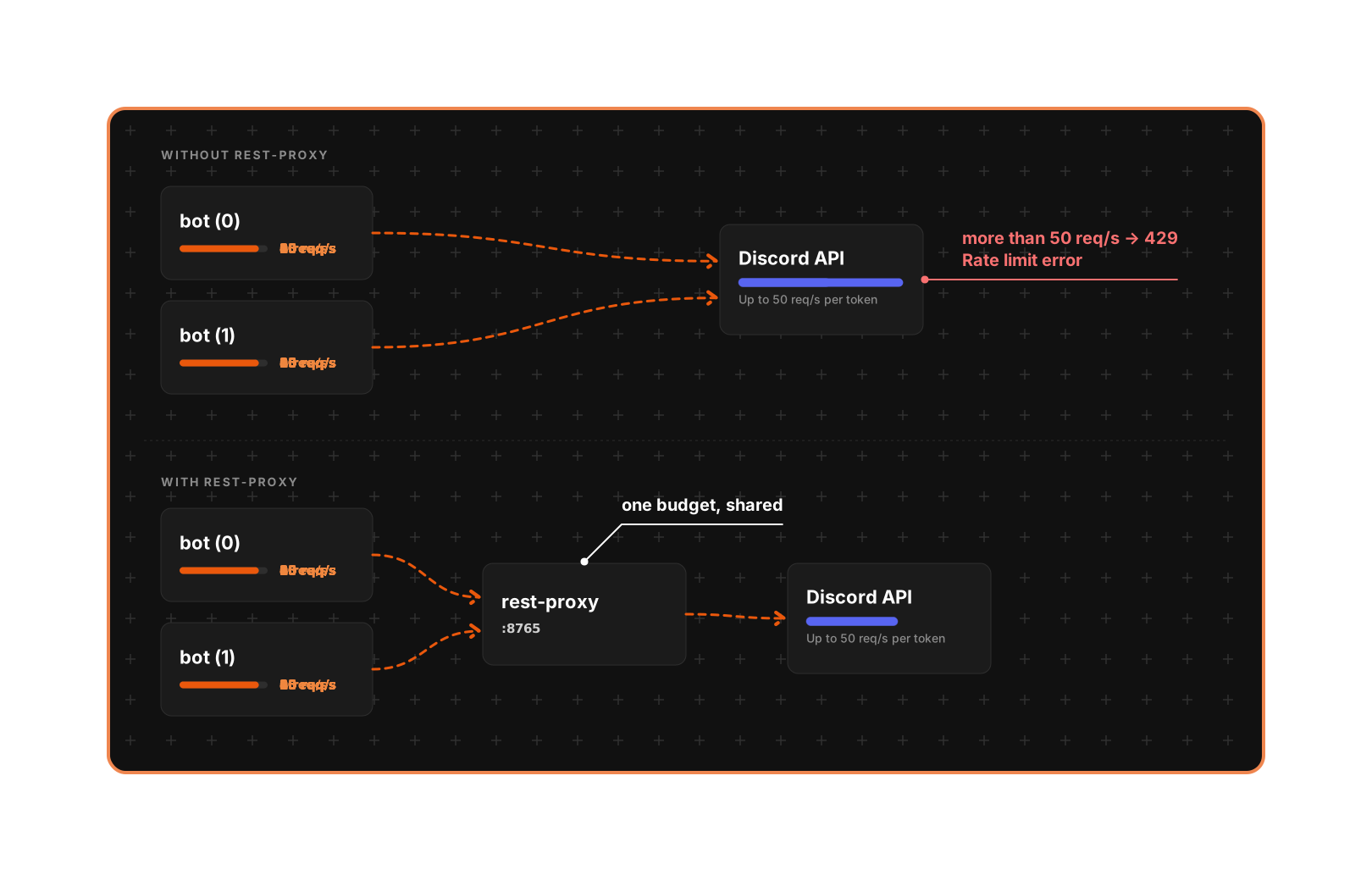
Discord allows roughly 50 REST requests per second **per token**, but the bot enforces that limit **per process**. Several processes sharing one token each think they own the whole budget and overrun it together. `rest-proxy` is a small server that owns the token's whole budget and hands it out, so the limit is counted once.
One limiter for one token, instead of one limiter per process.
You do not need it with a single bot process, so the service does not run until you ask for it. To turn it on, change the `rest-proxy` service in `docker-compose.yml` from `replicas: 0` to `replicas: 1`, then run `docker compose up -d`.
Edit the file rather than running `docker compose up -d --scale rest-proxy=1`. `--scale` applies to that one command, so the next plain `docker compose up -d` puts the service back to `0` and leaves the bot sending its requests to a container that no longer exists.
| Variable | Default | Meaning |
| -------------------------------------- | ------------- | --------------------------------------------------------------------------------------------------------------------------------------------------------------------------------- |
| `DISCORD_BOT_INSTANCE_REST_PROXY_URL` | commented out | Base URL of the proxy, `http://rest-proxy:8765/api`. When it is set, the bot sends every Discord request through the proxy and `DISCORD_BOT_INSTANCE_DISCORD_API_RPS` is ignored. |
| `DISCORD_BOT_INSTANCE_DISCORD_API_RPS` | `45` | Requests per second one bot process allows itself when no proxy is configured. Only lower this if Discord rate limits you. |
## Frontend build-time variables
These set the links the dashboard shows. `SITE_URL` is used only when building the frontend, to write `sitemap.xml`, `robots.txt` and the hreflang tags.
| Variable | Default |
| ------------------------------- | --------------------------------------- |
| `VITE_SUPPORT_URL` | `https://discord.com/invite/g4MfV6N` |
| `VITE_BOT_DOCS_URL` | `https://docs.membercounter.app/` |
| `VITE_BOT_REPO_URL` | `https://github.com/member-counter/bot` |
| `VITE_TRANSLATION_PLATFORM_URL` | `https://tolgee.membercounter.app/` |
| `SITE_URL` | commented out |
{% hint style="warning" %}
The dashboard is a static site, built before it is published. These five values are baked into the published frontend image, so **changing them in `.env` does not change the dashboard**. To change the links you must build the frontend image yourself.
{% endhint %}
Keep `VITE_BOT_REPO_URL` and `VITE_SUPPORT_URL` in `.env`. The bot process reads them at runtime and refuses to start without them.
### Building the frontend image yourself
The build never reads `.env`: every value is a Docker build argument, and the image takes two passes.
1. Clone the repository **with its git submodules**. The emoji picker's data lives in two submodules and the build fails without them. In a folder you already cloned, run `git submodule update --init --recursive` instead.
```bash
git clone --recurse-submodules -b master https://github.com/member-counter/bot.git
cd bot
```
2. Build the `builder` stage with your own values. Add `--build-arg SITE_URL=https://counters.example.com` too if you want `sitemap.xml` and `robots.txt`.
```bash
docker build -f apps/frontend/Dockerfile --target builder \
--platform linux/amd64 \
--build-arg VITE_SUPPORT_URL=https://discord.gg/your-invite \
--build-arg VITE_BOT_DOCS_URL=https://docs.example.com/ \
--build-arg VITE_BOT_REPO_URL=https://github.com/you/your-fork \
--build-arg VITE_TRANSLATION_PLATFORM_URL=https://translate.example.com/ \
-t my-frontend-builder .
```
3. Build the image you will run, pointing it at the image from step 2.
```bash
docker build -f apps/frontend/Dockerfile --target runner \
--build-arg JS_SOURCE_IMAGE=my-frontend-builder \
-t my-frontend .
```
4. Point the `frontend` service in `docker-compose.yml` at `my-frontend`, then run `docker compose up -d`.
Repeat both builds every time you change one of these values, and after every [update](/self-hosting/updating-a-self-hosted-bot.md): `docker compose pull` does not refresh your own image.
## Time zone
There is no time zone variable. The containers run in **UTC**, and that is the fallback the [Clock](/counters-reference/clock.md) and [Date](/counters-reference/date.md) counters use when no time zone is picked in the counter's options.
{% hint style="warning" %}
With no time zone picked, the dashboard's preview uses **your** time zone and the channel uses the bot's, so the two disagree by your offset from UTC. Pick a time zone in the counter and both agree, wherever the bot runs.
{% endhint %}
## Backups
The only state worth keeping is MongoDB's, stored at `./storage/db` inside the cloned folder. Redis holds cache only. To back up, stop the stack so Mongo is not written to mid-copy, copy the folder, and start again:
```bash
docker compose down
tar -czf member-counter-backup-$(date +%F).tar.gz storage/db .env
docker compose up -d
```
Back up `.env` with it. It holds your `COOKIE_SECRET`, and restoring the database without it logs everyone out.
To restore, stop the stack, replace `storage/db` with the backed-up copy, and start again. Take a backup before every update, as [Updating a self-hosted bot](/self-hosting/updating-a-self-hosted-bot.md) says.
{% hint style="danger" %}
Deleting `storage/db` deletes every server's counters, templates and settings. Nothing else has a copy.
{% endhint %}
If you are stuck, ask in the [support server](https://membercounter.app/support).
Technical details
* The `bot`, `backend`, `frontend`, `website`, `rest-proxy` and `db-utils` services load `.env` through `env_file: .env` in `docker-compose.yml`. The `mongo`, `setup-mongo-rs` and `redis` containers do not read it; their command line configures them.
* Each service validates `.env` at startup against its own env schema (`apps/backend/src/env.ts` and the equivalents under `apps/bot`, `packages/services` and `apps/rest-proxy`), which is where the defaults and the validation live. All set `emptyStringAsUndefined: true`, which is why an empty value counts as unset, and `WEBSITE_URL` and `DISCORD_OAUTH2_REDIRECT_URI` must parse as URLs.
* Built-in defaults in code, used when the variable is absent from `.env`: `BACKEND_PORT` 8080, `BDE_CALL_TIMEOUT` 2000 ms, `LOG_LEVEL` `info`, `OFFICIAL_WEBSITE_URL` `https://membercounter.app`, `REST_PROXY_PORT` 8765. The sharding variables have none, so they must stay in `.env`.
* The bot always requests the Guilds, GuildEmojisAndStickers and GuildModeration intents, and adds GuildMembers, GuildPresences and GuildVoiceStates from the two flags. Intents the Developer Portal has not switched on stop the bot at login with a disallowed intents error.
* The update round is a cron job: `0 */5 * * * *` when `IS_PREMIUM` is `true`, `0 */10 * * * *` when it is not.
* Log lines are `timestamp - level - [meta] - message`. The bot adds its instance: `bot | 2026-09-19T12:00:00.000Z - info - [bot: main (0)] - Bot ready`. Services with no metadata print empty brackets.
* On startup the bot logs `Invite link: …`, built from its own client ID and the permissions it needs, not from `MAIN_DISCORD_CLIENT_ID`.
* `DISCORD_BOT_INSTANCE_COMPUTE_PRIORITY`: each bot advertises its priority over the shared Redis every 5 minutes, and those keys expire after 15 minutes. Two bots with the same priority both write the channels. Processes of the same bot also throttle their gateway identifies through Redis, which is why they must share one `REDIS_URL`.
* The bot stats job runs hourly and logs `Sending bot stats...` and `Bot stats has been sent` even when the three listing-site tokens are empty; nothing is sent.
* Without `OPENEXCHANGERATESORG_KEY` the backend logs `OPENEXCHANGERATESORG_KEY is not set, all rates will be x1` at startup.
* With a Twitch or YouTube key set but `DISCORD_BOT_INSTANCE_IS_PREMIUM=false`, the counter's last error reads **The bot is not a premium version and lacks certain features needed for this counter.**
* The `website` service is an nginx mapping host `3000` to its own `80`; it rewrites `/api/(.*)` to `/$1` towards `backend:8080` and sends everything else to `frontend:80`. The backend also serves `/trpc` and `/health`, its own compose healthcheck.
* `BACKEND_MAX_TRUSTED_PROXIES` decides which entry of `X-Forwarded-For` the backend believes is the visitor. Too low and every visitor looks like your proxy; too high and a visitor can claim any address. `WEBSITE_URL` is the CORS origin.
* `rest-proxy` publishes no host port and needs only `DISCORD_BOT_INSTANCE_TOKEN` from the same `.env`. Run one per token, on the same machine as the bot processes that use it. Invalid requests count towards Discord's ban threshold of 10,000 per 10 minutes per IP address, which is what it avoids for multi-process tokens.
* The frontend image builds in two stages. The `runner` stage copies the compiled site from the image named by `JS_SOURCE_IMAGE`, which defaults to `scratch`, so a one-pass build fails with nothing to copy.
* `TOLGEE_API_KEY` is used only by the `tolgee:push` and `tolgee:pull` scripts of `apps/bot` and `apps/frontend`.
* Adding a `TZ` variable to the services, or running the bot outside Docker, makes that time zone the fallback instead of UTC. Counters with a time zone picked always use the picked one.