> For the complete documentation index, see [llms.txt](https://docs.membercounter.app/llms.txt). Markdown versions of documentation pages are available by appending `.md` to page URLs; this page is available as [Markdown](https://docs.membercounter.app/using-the-dashboard/channel-settings.md).

# Channel settings

Enable a template on a channel, and what the bot writes to the channel name or the channel topic.

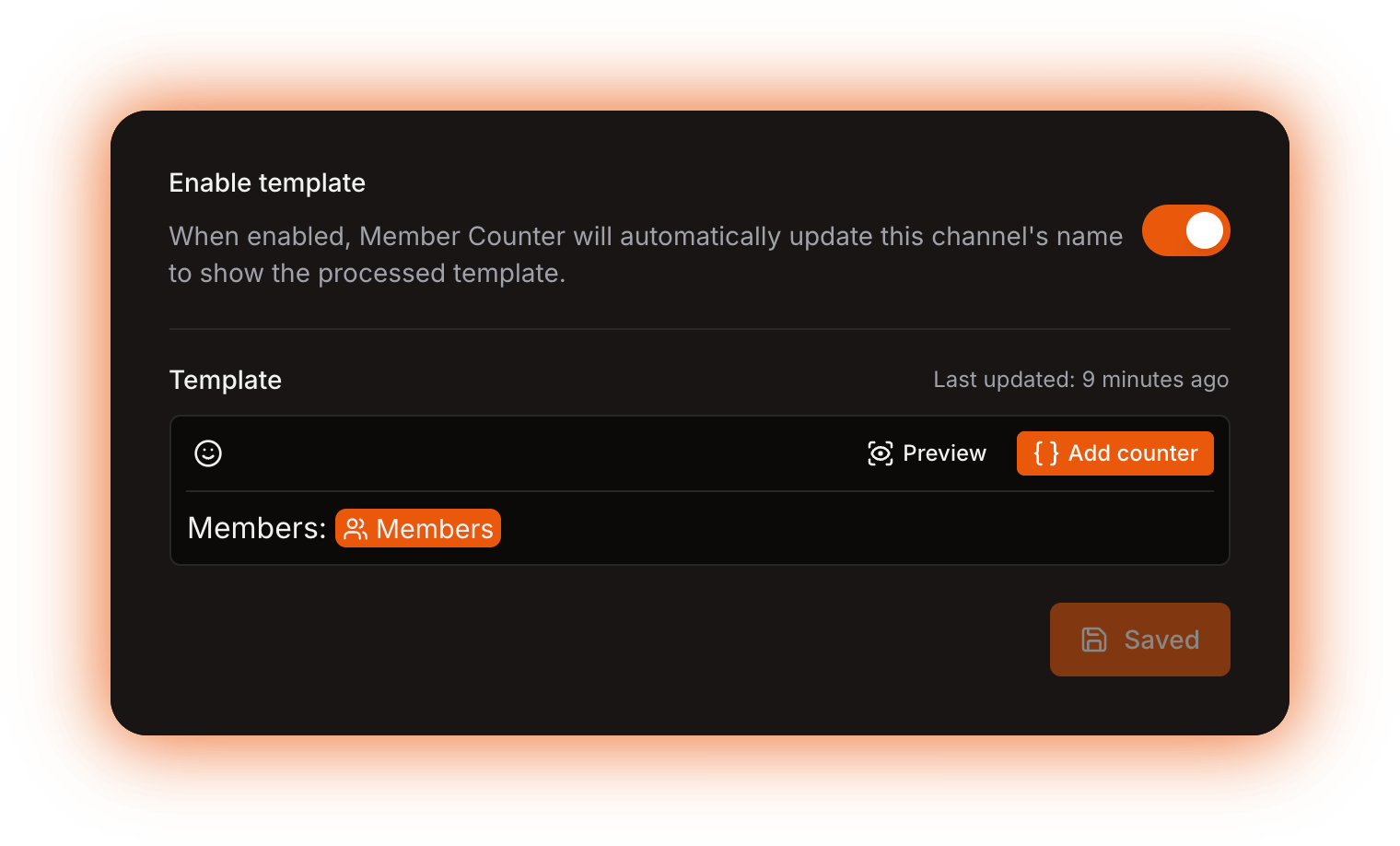
Every channel has its own page on the dashboard. Pick a channel in the sidebar and you get one switch, one template, and any warnings that apply.

<figure><img src="https://1582170640-files.gitbook.io/~/files/v0/b/gitbook-x-prod.appspot.com/o/spaces%2F-Lu2S5r7lKtu4IK5ucu9%2Fuploads%2Fgit-blob-baf54787e27219bd473f67e97ba2c3a102e3ca69%2Fsettings-channel-page.png?alt=media" alt="A channel page"><figcaption><p>The Enable template switch, the template editor with its Last updated caption, and the Save button</p></figcaption></figure>

## Which channels the bot can update

| Channel type                 | The bot sets the |
| ---------------------------- | ---------------- |
| Text or announcement channel | channel topic    |
| Voice channel or category    | channel name     |

Any other type is greyed out because it is not supported yet.

Voice channels are the usual choice, because their name is always visible in the channel list. A text channel hides its topic behind the channel header.

## Enable template

The switch at the top decides whether the bot touches the channel at all. Turn it off and your template is kept, but the channel is left alone. The bot turns it off by itself when the channel is deleted.

## Template

You write the template in the [template editor](/using-the-dashboard/template-editor.md). **Last updated** is when the bot last processed this channel, not when you last saved, and it stays unknown until the bot processes it for the first time.

Editing changes nothing until you press **Save**, which saves the switch and the template together. Autosave does it for you if you turn it on from [your account](/using-the-dashboard/account.md).

| Limit                 | Value           | What happens when you cross it                                                                                                                                   |
| --------------------- | --------------- | ---------------------------------------------------------------------------------------------------------------------------------------------------------------- |
| Channel topic length  | 1023 characters | The result is cut to 1023 characters.                                                                                                                            |
| Channel name length   | 99 characters   | The result is cut to 99 characters.                                                                                                                              |
| Channel name minimum  | 2 characters    | The update fails with **The result for the channel name is less than 2 characters long.** Spaces are trimmed first, so pad a short name with a word or an emoji. |
| Time per counter chip | 60 seconds      | Counts every counter nested inside the chip. The update fails with an evaluation timeout.                                                                        |

Discord also throttles how often a channel may be renamed, and the bot only rewrites channels on a schedule, see [How counters update](/using-the-dashboard/how-counters-update.md).

{% hint style="warning" %}
Custom digits only apply to channel **topics**. Channel **names** get plain digits, whatever you set in [Server settings](/using-the-dashboard/server-settings.md) or in a counter's **Format settings**, because Discord does not render them there. Compact notation works everywhere. See [Formatting counters](/using-the-dashboard/customizing-counters.md).
{% endhint %}

## The missing permissions warning

If the bot cannot edit the channel, a warning on the channel page lists what is needed: **View Channel** and **Manage Channel**, plus **Connect** on a voice channel. Fix the permissions in Discord (usually a channel-level override) and press **Check again**.

<figure><img src="https://1582170640-files.gitbook.io/~/files/v0/b/gitbook-x-prod.appspot.com/o/spaces%2F-Lu2S5r7lKtu4IK5ucu9%2Fuploads%2Fgit-blob-6781eee0901fc6175a20f34067bf8abdd06d952b%2Fsettings-channel-missing-permissions.png?alt=media" alt="The missing permissions warning"><figcaption><p>The permissions the bot needs on this specific channel</p></figcaption></figure>

## The template error card

When the last run failed, the page shows the message from that run. If the bot hit something it does not recognise, the message is **An unknown error occurred.**

While a template is failing, the bot writes `ERROR!` into the channel name or topic on every run, so a channel renamed to `ERROR!` means the template is broken. The card reports the last scheduled update, so it can linger after you fix the cause. Use **Preview** to check your fix straight away, and see [Troubleshooting](/using-the-dashboard/troubleshooting.md) for the common messages.

<figure><img src="https://1582170640-files.gitbook.io/~/files/v0/b/gitbook-x-prod.appspot.com/o/spaces%2F-Lu2S5r7lKtu4IK5ucu9%2Fuploads%2Fgit-blob-e09b4fc3983c1b914a9b54ccbd16559170ebbcea%2Fdashboard-template-error.png?alt=media" alt="The template error card"><figcaption><p>What the last failed update reported</p></figcaption></figure>

<details>

<summary>Technical details</summary>

* The 60-second budget applies per delimited counter in the template and raises `EVALUATION_TIMEOUT`; nested counters spend the same budget. The nested-counter explorer also stops after 50,000 steps.
* The channel update job skips the Discord edit when the computed value equals the current name or topic, so **Last updated** moves on runs that changed nothing.
* On a failed evaluation the same job writes `jobs.updateChannels.computeError` into the name or topic. It is `ERROR!` in en-US, translated with the Discord server's `preferredLocale`, so it can reach the channel in another language.
* A non-fatal error is stored in the same place as a fatal one (the job saves `nonFatalErrors[0]`), so an HTTP counter that used its fallback still shows the error even though the channel was updated correctly.
* The dashboard permission check is the `bot.canBotEditChannel` query; the bot runs its own check for Manage Channels, View Channel, and Connect on a voice channel, logs `NO_ENOUGH_PERMISSIONS_TO_EDIT_CHANNEL` and skips the channel.
* A Discord `UnknownChannel` reply makes the job call `disableTemplate`, which is what turns the switch off for a deleted channel.
* The logs are two Redis keys per channel with no expiry: `cl:<channelId>:e` (last error) and `cl:<channelId>:t` (last update, a millisecond timestamp). A successful run deletes the error key.
* The card prints one of the 25 names in `packages/common/src/KnownError/DataSourceError.ts` (a channel name under 2 characters is `EVALUATION_RESULT_FOR_CHANNEL_NAME_IS_LESS_THAN_2_CHARACTERS`), or **An unknown error occurred.** for anything else.

</details>
