> For the complete documentation index, see [llms.txt](https://docs.membercounter.app/llms.txt). Markdown versions of documentation pages are available by appending `.md` to page URLs; this page is available as [Markdown](https://docs.membercounter.app/using-the-dashboard/customizing-counters.md).
# Formatting counters
Change how a single counter prints its number, with compact notation, a locale and custom digits.
Every number a counter returns is formatted with compact notation, a locale and custom digits. [Server settings](/using-the-dashboard/server-settings.md) sets them for the whole server; **Format settings** sets them for one counter.
Click a counter chip in the [template editor](/using-the-dashboard/template-editor.md) to open its edit panel, then expand **Format settings**. It always edits the counter that owns the chip, even while you are drilled into one of its [nested counters](/using-the-dashboard/nested-counters.md). A nested counter has no format settings of its own.
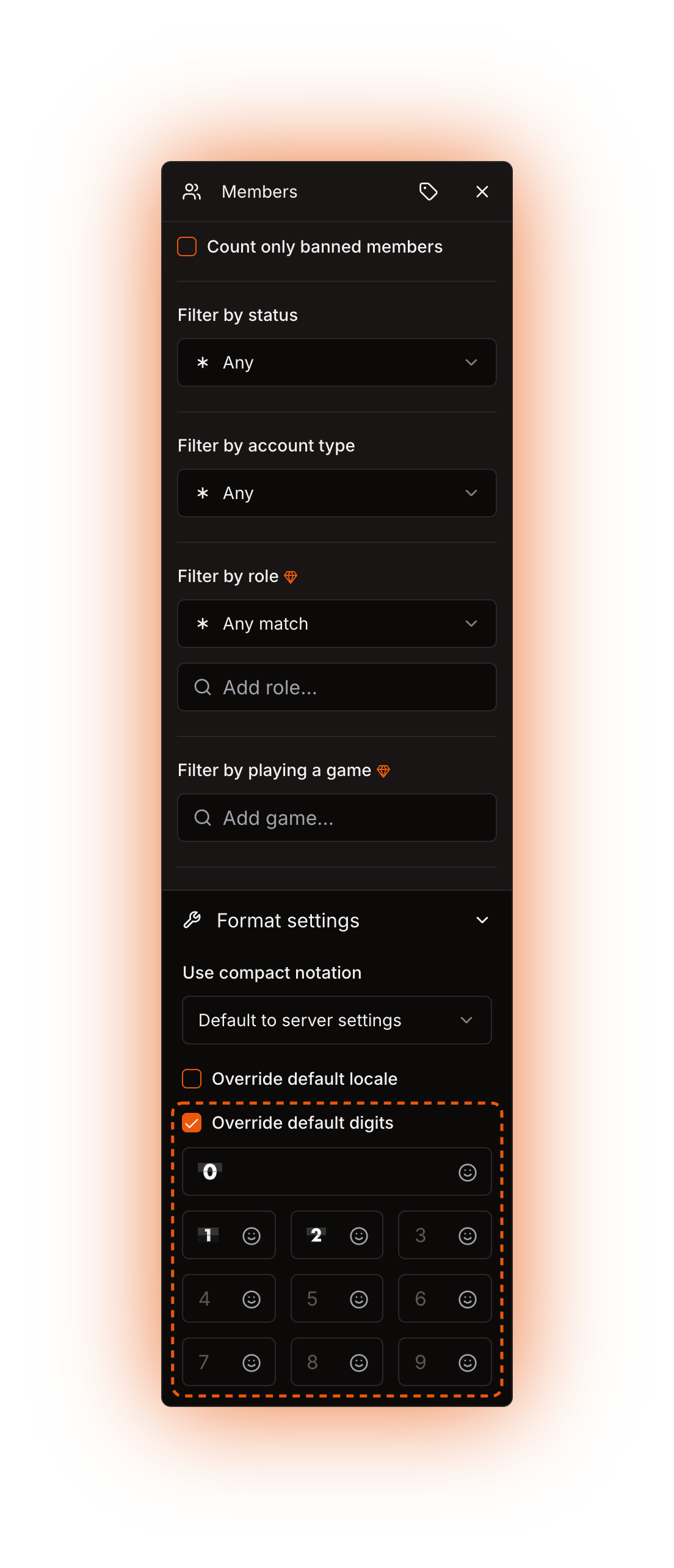
The three controls inside Format settings.
## Use compact notation
| Option | What it does |
| ------------------------------ | -------------------------------------------------------------------------------------------- |
| **Default to server settings** | Follow the server's **Use compact notation for numbers** switch. This is the starting value. |
| **Yes** | Always shorten the number for this counter. |
| **No** | Always print the number in full for this counter. |
Compact notation shortens large numbers the way the locale does it. In `en-US`, `12300` becomes `12K` and `1500000` becomes `1.5M`. In `de-DE`, `1500000` becomes `1,5 Mio.` Pick **No** on a counter whose exact value matters, such as a Nitro booster count, while the rest of the server stays compact.
## Override default locale
Tick the checkbox and pick a locale for this counter only, or leave it clear to use the server's locale. The list holds the full ISO locale set, and you can also type a tag that is not listed and select what you typed. The locale decides the group separator and decimal mark of a number, the suffix compact notation uses (`K`, `mil`, `万`), and the words the [Clock](/counters-reference/clock.md) and [Date](/counters-reference/date.md) counters print, such as month and weekday names.
{% hint style="warning" %}
**Tick the checkbox only if you are going to pick a value.** Ticking it stores an empty locale right away, and the bot does not ignore an empty or malformed tag. A counter that returns a number and uses compact notation fails: the channel page shows *"An unknown error occurred."* and the bot writes the literal text `ERROR!` into the channel on the next update. A malformed tag such as `en_US` breaks Clock and Date too. To drop a locale of your own on this counter, untick the checkbox instead of clearing the combobox.
{% endhint %}
## Override default digits
Tick the checkbox and ten inputs appear, one per digit. Whatever you put in an input replaces that digit in this counter's output.
One input per digit.
The inputs work like the ones in [Server settings](/using-the-dashboard/server-settings.md#custom-digits). Custom digits are hard for screen readers to read out, for the reasons given there.
## Which setting wins
Digits resolve one by one, so a counter can override three digits and take the other seven from the server. A digit that is empty in both places falls back to the plain digit for that position.
## Display label
**Display label** opens from the tag button in the edit panel. It is a custom name shown on this counter's chip in the editor, and it does not change the channel output. Use it to tell several similar chips apart, such as three [Roles](/counters-reference/roles.md) counters in one template. Clear the field to go back to the counter's normal chip text. Unlike **Format settings**, the display label follows whichever counter you are looking at, so a label set on a [nested counter](/using-the-dashboard/nested-counters.md) names it in the breadcrumb.
A display label renames the chip in the editor only.
## What is never formatted
* **Counters that return text.** [Clock](/counters-reference/clock.md), [Date](/counters-reference/date.md), [Countdown](/counters-reference/countdown.md), [Concat](/counters-reference/concat.md) and [Replace](/counters-reference/replace.md) print exactly what they return. A locale still matters to Clock and Date, because they use it to build that text in the first place.
* **Channel names.** Custom digits only reach the **topic** of a text or announcement channel, because Discord channel names cannot show them. Compact notation still applies to a name. See [Channel settings](/using-the-dashboard/channel-settings.md).
* **Nested counters.** The bot formats the outermost result only. A [Math](/counters-reference/math.md) counter that adds two Members counters formats the sum once, not the two parts.
{% hint style="warning" %}
**Do not wrap a number in a counter that returns text.** A number counter inside a [Concat](/counters-reference/concat.md) or a [Replace](/counters-reference/replace.md) loses every setting on this page, because the outer result is already text. Write the literal text in the template around the counter instead: `Members:` and then the counter, not a Concat of the two.
{% endhint %}
## Examples
{% tabs %}
{% tab title="Exact numbers in one channel" %}
The server is compact by default, but the booster channel should show the real number. The server keeps **Use compact notation for numbers** on, and the [Nitro boosters](/counters-reference/nitro-boosters.md) counter sets **Use compact notation** to **No**. A server with `1250` boosts then shows `1.3K` everywhere and `1250` in that one channel.
{% endtab %}
{% tab title="A Japanese clock in an English server" %}
The server locale is `en-US`, but one channel should read as Japanese. The [Date](/counters-reference/date.md) counter ticks **Override default locale** and picks `ja-JP`. Everything else in the server keeps English month and weekday names.
{% endtab %}
{% tab title="Emoji digits on one counter" %}
The [Members](/counters-reference/members.md) counter sits in the **topic** of a text channel, with **Override default digits** ticked and each input filled with a custom server emoji. `438` prints as the emoji for `4`, `3` and `8`. Move the same counter to a voice channel name and it prints `438`.
{% endtab %}
{% endtabs %}
Technical details
* Resolution at evaluation time, per field: `locale = dataSource.format.locale ?? guild.formatSettings.locale`, same for `compactNotation`, and digit `i` = the counter's digit when non-empty, else the guild digit when non-empty, else the literal digit (`packages/services/src/DataSource/index.ts`).
* The root counter's prepared format settings are passed to every nested evaluator, so a nested Clock gets the locale, but only the outermost value goes through the formatter.
* Compact notation is `new Intl.NumberFormat(locale, { notation: "compact" })` with the locale as stored. An invalid tag throws a `RangeError` there; the job stores its raw message in `LastTemplateComputeError` and writes the string `ERROR!` into the channel. The channel page shows "An unknown error occurred." because any message that is not a `DataSourceErrorNames` value falls back to `UNKNOWN`.
* Evaluators get the locale replaced with `en-US` when it is shorter than two characters; the formatter does not, which is why an empty locale breaks number counters but not Clock or Date.
* Digit substitution runs only when `isTextLikeChannel(channelType)` is true, so voice and category names skip it.
* A number counter whose result is `NaN` raises `FAILED_TO_RETURN_A_FINAL_STRING`: "Failed to generate a final string from the evaluation."
* A digit input accepts the same marks and emojis as a channel topic, and it takes no nested counters.
* **Display label** is stored as `displayLabel` on the counter's JSON and is never read during evaluation.
* Nothing on this page depends on an environment variable when self-hosting.