> For the complete documentation index, see [llms.txt](https://docs.membercounter.app/llms.txt). Markdown versions of documentation pages are available by appending `.md` to page URLs; this page is available as [Markdown](https://docs.membercounter.app/using-the-dashboard/troubleshooting.md).

# Troubleshooting

What each error means and how to fix it.

The table at the end lists every error message the bot can show.

## Start here

Open the channel's page in the [dashboard](https://membercounter.app/dashboard) first: almost every problem shows up there. Pick the server, then pick the channel in the list on the left.

* **Enable template**: if this is off, the bot ignores the channel completely.
* **Last updated:** when the bot last processed the template. Minutes old means the bot is working. Hours old means it is not reaching the channel. **Unknown date** means it has never processed the channel: check that **Enable template** is on and that the bot is in the server.
* The dot next to the channel in the list: a coloured dot marks a channel with **Enable template** on, and it turns red when that channel has an issue. A channel with the template off has no dot, and a red dot clears itself on the next successful refresh.

<figure><img src="https://1582170640-files.gitbook.io/~/files/v0/b/gitbook-x-prod.appspot.com/o/spaces%2F-Lu2S5r7lKtu4IK5ucu9%2Fuploads%2Fgit-blob-08139e09edd1ed1a0f95069a3329c5cc83a47c8d%2Fdashboard-channel-nav-issue-marker.png?alt=media" alt="Channel list with a red issue marker"><figcaption><p>A red dot in the dashboard channel list marks a channel that needs attention.</p></figcaption></figure>

## The channel shows ERROR!

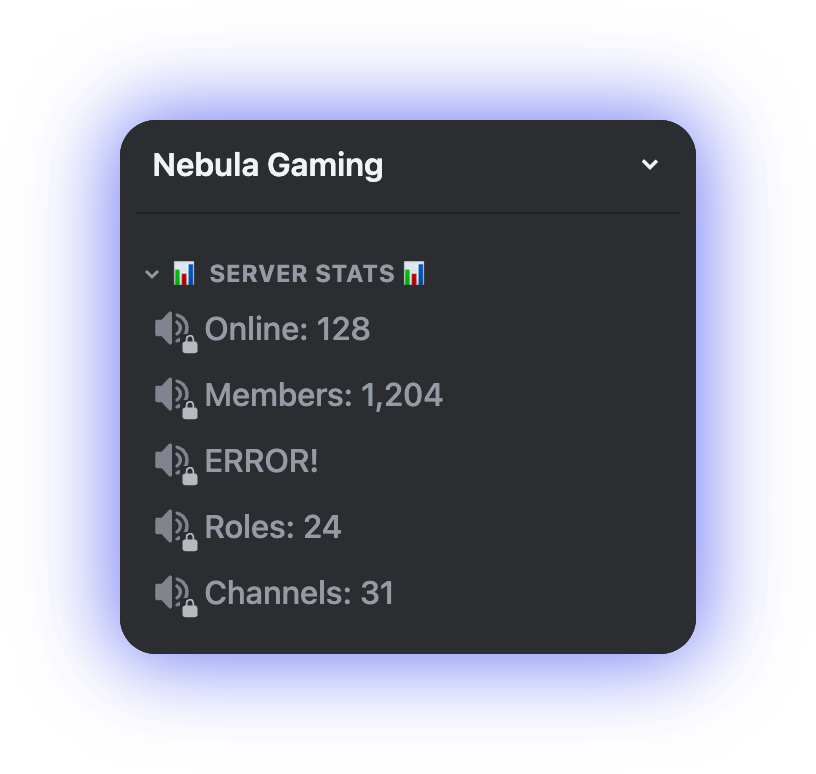
**Symptom.** The channel name, or the channel topic, is a short error word and nothing else.

<figure><img src="https://1582170640-files.gitbook.io/~/files/v0/b/gitbook-x-prod.appspot.com/o/spaces%2F-Lu2S5r7lKtu4IK5ucu9%2Fuploads%2Fgit-blob-37ae390c0ec4068a190334e29a9db5dccef3ec6a%2Fdiscord-channel-error.png?alt=media" alt="A counter channel renamed to the error placeholder"><figcaption><p>When a template cannot be processed, the bot writes a placeholder in the server's language in place of the value.</p></figcaption></figure>

**Cause.** The template could not be processed, so the bot wrote a placeholder instead of leaving a stale value in place. The real reason is only shown on the dashboard.

The word follows your server's language in Discord, so it may not read `ERROR!`.

**Fix.**

1. Open the channel in the dashboard.
2. Read the message in the red box under **The template had an error when it was last processed**.
3. Look it up in [the table at the end of this page](#error-messages) and apply the fix.
4. Wait for the next refresh. See [How counters update](/using-the-dashboard/how-counters-update.md) for the interval.

{% hint style="info" %}
The bot writes the template result to the topic of text and announcement channels, and to the name of voice channels and categories. A placeholder means the same thing in both.
{% endhint %}

## A counter is not updating

The channel shows a value, but it is out of date. Work through these in order.

1. **The value did not change.** The bot only writes when the new result differs from what the channel already says. If **Last updated:** is recent, the bot had nothing new to write.
2. **You are looking too soon.** The public bot refreshes every 10 minutes, and its member counts come from an approximate figure that is only re-fetched every 20 minutes. See [How counters update](/using-the-dashboard/how-counters-update.md).
3. **Another bot took the server over.** A [custom bot](/custom-bot/custom-bot.md) handles the counters instead of the public bot. If it is offline, the counters stop until the public bot picks the server back up, which takes about 30 minutes. See [Which bot updates your server](/using-the-dashboard/how-counters-update.md#which-bot-updates-your-server).
4. **The template is disabled.** Turn **Enable template** back on for that channel. See [Channel settings](/using-the-dashboard/channel-settings.md).
5. **The counter caches its value.** Twitch and Reddit reuse a value for 15 minutes, Memerator for 30, YouTube for 60, and an [HTTP](/counters-reference/http.md) counter for the **Lifetime (in seconds)** you set.
6. **Discord is throttling the rename.** Channel renames are rate limited per channel. The bot's edit is queued and goes through once Discord accepts it. Using a channel topic does not help.
7. **It is a** [**Clock**](/counters-reference/clock.md) **or a** [**Date**](/counters-reference/date.md)**.** Both round to the nearest 5 minutes, so they never show seconds and change at most every 5 minutes. See [Clock and Date round to 5 minutes](/using-the-dashboard/how-counters-update.md#clock-and-date-round-to-5-minutes).

## The bot cannot edit the channel

**Symptom.** A red alert on the channel page: **The bot does not have permission to edit this channel.** The channel keeps its old value.

<figure><img src="https://1582170640-files.gitbook.io/~/files/v0/b/gitbook-x-prod.appspot.com/o/spaces%2F-Lu2S5r7lKtu4IK5ucu9%2Fuploads%2Fgit-blob-1851ef980e2e32c31d7963c4997b6ab394afc6dd%2Fdashboard-missing-permissions.png?alt=media" alt="Missing permissions alert on the channel page"><figcaption><p>The dashboard lists the permissions the bot needs in that channel; check each one yourself.</p></figcaption></figure>

**Cause.** The bot checks its permissions in that specific channel before editing. The alert does not say which one is missing: it lists what the bot needs, and you compare that list against the channel yourself.

| Permission         | Needed for                                                                |
| ------------------ | ------------------------------------------------------------------------- |
| **View Channel**   | Every counter channel                                                     |
| **Manage Channel** | Every counter channel. This is what allows the rename or the topic change |
| **Connect**        | Voice channels only                                                       |

A server-wide permission is not enough. A channel overwrite, or a category overwrite the channel inherits, can take the permission away again for that one channel.

**Fix.** In Discord, open the channel's settings, then **Permissions**. Check the bot's role and every overwrite that applies to it, including the category the channel sits in. Back in the dashboard, press **Check again**.

{% hint style="warning" %}
The bot never reports this in Discord, so a permissions problem is silent until you look at the dashboard.
{% endhint %}

## "The template had an error when it was last processed"

**Symptom.** That label on the channel page, with the error message in a box below it.

<figure><img src="https://1582170640-files.gitbook.io/~/files/v0/b/gitbook-x-prod.appspot.com/o/spaces%2F-Lu2S5r7lKtu4IK5ucu9%2Fuploads%2Fgit-blob-e09b4fc3983c1b914a9b54ccbd16559170ebbcea%2Fdashboard-template-error.png?alt=media" alt="Template error on the channel page"><figcaption><p>The red box carries the exact message; look it up in the table below.</p></figcaption></figure>

**Cause.** This is the record of the last processing attempt, and it covers two cases:

* The template failed outright, and the channel now shows [the error placeholder](#the-channel-shows-error).
* The template succeeded but one counter fell back to a default. The channel updated correctly, and the message says what was skipped. This is what an [HTTP](/counters-reference/http.md) counter with a **Fallback value** does when its request fails.

So the message on its own does not mean the counter is broken. Compare it with the channel's current value.

**Fix.** Find the message in the table below. It is rewritten on the next processing attempt and disappears once the template works cleanly.

## The bot is offline

* **The public bot is restarting.** Counters resume at the next scheduled tick, up to a full interval later.
* **Your custom bot is stopped.** Start it again from the [control panel](/custom-bot/control-panel.md), and check the subscription in [Managing your subscription](/custom-bot/managing-your-subscription.md).
* **Your custom bot will not start.** The dashboard shows **Bot failed to start (check the token or intents)**. Turn on PRESENCE INTENT and SERVER MEMBERS INTENT in your own application, as described in [Creating a Discord bot account](/custom-bot/creating-a-discord-bot-account.md), then start the bot again.
* **Your self-hosted bot is down.** Check the container logs. See [Updating a self-hosted bot](/self-hosting/updating-a-self-hosted-bot.md) and the [configuration reference](/self-hosting/configuration.md).
* **The bot was removed from the server.** Invite it again from [Adding the bot to the server](/getting-started/adding-bot-to-the-server.md). Your counters are stored server-side and come back with it.

## A command replies with ERROR!

**Symptom.** A slash command answers with an error embed: **Something went wrong, please try again later.** Copy the **Error ID** below it into your support request. The embed is written in your own Discord language, so it may not be in English.

**Cause.** The command itself failed. That is separate from counters failing.

**Fix.** Retry once. If it fails again, report it in the [support server](https://membercounter.app/support) with the command you ran, your server ID and roughly what time it was. The maintainers match that against the bot's logs.

## Error messages

These are the messages the bot shows under **The template had an error when it was last processed**. The wording is exact.

{% hint style="info" %}
For an [HTTP](/counters-reference/http.md) counter, set a **Fallback value**: the channel keeps a sensible value when the request fails, and the failure is still reported here. **Lifetime (in seconds)** is not a fix, it only controls how long a successful response is cached.
{% endhint %}

| Message                                                                                                             | What to do                                                                                                                                                                                                                                                                                                                                                                                                                                             |
| ------------------------------------------------------------------------------------------------------------------- | ------------------------------------------------------------------------------------------------------------------------------------------------------------------------------------------------------------------------------------------------------------------------------------------------------------------------------------------------------------------------------------------------------------------------------------------------------ |
| The bot does not have sufficient permissions to edit the channel.                                                   | Fix the channel and category overwrites, then press **Check again**. See [above](#the-bot-cannot-edit-the-channel)                                                                                                                                                                                                                                                                                                                                     |
| The result for the channel name is less than 2 characters long.                                                     | Discord will not accept a name that short. Add fixed text around the counter, for example `Members: {counter}`. Voice channels and categories only                                                                                                                                                                                                                                                                                                     |
| The evaluation took too long and timed out.                                                                         | One counter took more than 60 seconds. Usually a [Game](/counters-reference/game.md) counter pointing at an unreachable server, or a template stacking a lot of [nested counters](/using-the-dashboard/nested-counters.md). Check the target and cut the template down                                                                                                                                                                                 |
| The bot does not have enough privileged intents to use this counter.                                                | On the legacy premium bot this is expected: it has no privileged intents, so the finer Members filters need a [custom bot](/custom-bot/custom-bot.md) or a [self-hosted bot](/self-hosting/self-hosting.md). On those two, turn on PRESENCE INTENT and SERVER MEMBERS INTENT in your own application, then start it again. See [Creating a Discord bot account](/custom-bot/creating-a-discord-bot-account.md)                                         |
| The bot is not a premium version and lacks certain features needed for this counter.                                | The counter needs a privileged bot, and the public bot is handling this server. Simplify the counter, or move to a [custom bot](/custom-bot/custom-bot.md) or a [self-hosted bot](/self-hosting/self-hosting.md). See [Members](/counters-reference/members.md) for the filters the public bot supports                                                                                                                                                |
| The member counts are not available at this moment.                                                                 | Discord has not given the bot an approximate member count yet. Wait: the public bot re-fetches every 20 minutes. If it lasts for hours, re-invite the bot                                                                                                                                                                                                                                                                                              |
| The Twitch counter requires a username to be set.                                                                   | Fill in **Username** on the [Twitch](/counters-reference/twitch.md) counter                                                                                                                                                                                                                                                                                                                                                                            |
| The specified Twitch channel could not be found.                                                                    | Check the spelling. Use the login name from the channel's URL, not its display name                                                                                                                                                                                                                                                                                                                                                                    |
| The YouTube counter requires a channel URL to be set.                                                               | Paste the channel address into the [YouTube](/counters-reference/youtube.md) counter                                                                                                                                                                                                                                                                                                                                                                   |
| The provided YouTube channel URL is invalid.                                                                        | Open the channel on YouTube and copy the URL from the address bar                                                                                                                                                                                                                                                                                                                                                                                      |
| A subreddit must be provided for the Reddit counter.                                                                | Enter the subreddit name without `r/` on the [Reddit](/counters-reference/reddit.md) counter                                                                                                                                                                                                                                                                                                                                                           |
| The Memerator counter requires a username, which is missing.                                                        | Enter the [Memerator](/counters-reference/memerator.md) username                                                                                                                                                                                                                                                                                                                                                                                       |
| The HTTP counter requires a URL, which is missing.                                                                  | Enter the full URL, including `https://`                                                                                                                                                                                                                                                                                                                                                                                                               |
| The content type of the HTTP response is invalid (not text/plain or application/json).                              | The URL answered with something else, typically an HTML page. Point the counter at an endpoint that returns JSON or plain text                                                                                                                                                                                                                                                                                                                         |
| The HTTP response status code is invalid (not 200).                                                                 | The server answered with an error or a redirect. Open the URL in a browser, follow any redirect yourself and use the final address                                                                                                                                                                                                                                                                                                                     |
| A data path must be specified for HTTP requests whose content type is application/json.                             | Set **Data path** to the value you want, for example `data.count`                                                                                                                                                                                                                                                                                                                                                                                      |
| The game counter requires a server address.                                                                         | Enter the game server's hostname or IP                                                                                                                                                                                                                                                                                                                                                                                                                 |
| The game counter requires a server port.                                                                            | Enter the query port for that game                                                                                                                                                                                                                                                                                                                                                                                                                     |
| A game ID must be provided for the game counter.                                                                    | Pick the game in the counter's options                                                                                                                                                                                                                                                                                                                                                                                                                 |
| The counter provided is unknown or not recognized. The counter is in a unrecognized format. The counter is invalid. | The stored counter could not be read. Rebuild it in the [template editor](/using-the-dashboard/template-editor.md). On a [self-hosted bot](/self-hosting/self-hosting.md) it can also be an old template on a version that is behind: update the bot                                                                                                                                                                                                   |
| The type of value returned from evaluation is unknown.                                                              | A [nested counter](/using-the-dashboard/nested-counters.md) is plugged into an option that cannot take one. Hovering the gear button on a nested counter's row says what that option must return                                                                                                                                                                                                                                                       |
| Failed to generate a final string from the evaluation.                                                              | A counter that needs a number was given text, for example a [Math](/counters-reference/math.md) counter. Check the inputs of your value counters                                                                                                                                                                                                                                                                                                       |
| An unknown error occurred.                                                                                          | The catch-all. Check for a slow or unreachable [HTTP](/counters-reference/http.md) endpoint, a **Data path** that does not match the response, a [Game](/counters-reference/game.md) server that does not answer, or a **Timezone** from a [nested counter](/using-the-dashboard/nested-counters.md) that is not a real identifier such as `Europe/Madrid`. If none of those fit, report it in the [support server](https://membercounter.app/support) |

## Still stuck

Bring these three things to the [support server](https://membercounter.app/support) and someone can help quickly:

* Your server ID and the channel that is misbehaving.
* The exact message from the red error box, or the command you ran and roughly when.
* Whether the server is on the public bot, a custom bot or a self-hosted bot.

<details>

<summary>Technical details</summary>

* The channel placeholder is the `jobs.updateChannels.computeError` string, picked by `guild.preferredLocale` (the server's language in Discord, not the dashboard account language), with 16 translations; anything else falls back to `ERROR!`.
* The red box holds an error code stored in the channel log and translated in the browser. Any stored code that is not one of `DataSourceErrorNames` is rendered as **An unknown error occurred.**, which is why the catch-all row covers unrelated failures.
* The bot's strings live in `apps/bot/src/locales/<lang>/main.json` and the dashboard's error strings in `apps/frontend/src/locales/en-US/main.json` under `common.knownErrors`.
* A self-hosted bot missing `YOUTUBE_API_KEY`, `TWITCH_CLIENT_ID` and `TWITCH_CLIENT_SECRET`, or `MEMERATOR_API_KEY` throws a plain `Error` in the evaluator, so those counters land on **An unknown error occurred.** instead of a specific message.
* The 60 s evaluation timeout is per counter part and covers everything nested inside it.
* Outgoing requests from the HTTP, Reddit, YouTube and Memerator counters abort after 5 seconds, so a slow endpoint reports its own error rather than the evaluation timeout.
* The permission check combines the bot's role permissions with every overwrite that applies to that channel. A failure is written to the channel log as `NO_ENOUGH_PERMISSIONS_TO_EDIT_CHANNEL` and the channel is skipped.
* A template that evaluates with non-fatal errors still updates the channel, and the first of those errors is what the red box shows.

</details>